Tuesday, 17 January 2017

differences between HTTP 1.0 and HTTP 1.1?

Proxy support and the Host field:
HTTP 1.1 has a required Host header by spec.
HTTP 1.0 does not officially require a Host header, but it doesn't hurt to add one, and many applications (proxies) expect to see the Host header regardless of the protocol version.
Example:
GET / HTTP/1.1
Host: www.blahblahblahblah.com
This header is useful because it allows you to route a message through proxy servers, and also because your web server can distinguish between different sites on the same server.
So this means if you have blahblahlbah.com and helohelohelo.com both pointing to the same IP. Your web server can use the Host field to distinguish which site the client machine wants.
Persistent connections:
HTTP 1.1 also allows you to have persistent connections which means that you can have more than one request/response on the same HTTP connection.
In HTTP 1.0 you had to open a new connection for each request/response pair. And after each response the connection would be closed. This lead to some big efficiency problems because of TCP Slow Start.
OPTIONS method:
HTTP/1.1 introduces the OPTIONS method. An HTTP client can use this method to determine the abilities of the HTTP server. It's mostly used for Cross Origin Resource Sharing in web applications.
Caching:
HTTP 1.0 had support for caching via the header: If-Modified-Since.
HTTP 1.1 expands on the caching support a lot by using something called 'entity tag'. If 2 resources are the same, then they will have the same entity tags.
HTTP 1.1 also adds the If-Unmodified-Since, If-Match, If-None-Match conditional headers.
There are also further additions relating to caching like the Cache-Control header.
100 Continue status:
There is a new return code in HTTP/1.1 100 Continue. This is to prevent a client from sending a large request when that client is not even sure if the server can process the request, or is authorized to process the request. In this case the client sends only the headers, and the server will tell the client 100 Continue, go ahead with the body.
Much more:
  • Digest authentication and proxy authentication
  • Extra new status codes
  • Chunked transfer encoding
  • Connection header
  • Enhanced compression support
  • Much much more.

Monday, 16 January 2017

A Beginner's Guide To Scaling To 11 Million+ Users On Amazon's AWS

How do you scale a system from one user to more than 11 million users? Joel Williams, Amazon Web Services Solutions Architect, gives an excellent talk on just that subject: AWS re:Invent 2015 Scaling Up to Your First 10 Million Users.
If you are an advanced AWS user this talk is not for you, but it’s a great way to get started if you are new to AWS, new to the cloud, or if you haven’t kept up with with constant stream of new features Amazon keeps pumping out.
As you might expect since this is a talk by Amazon that Amazon services are always front and center as the solution to any problem. Their platform play is impressive and instructive. It's obvious by how the pieces all fit together Amazon has done a great job of mapping out what users need and then making sure they have a product in that space. 
Some of the interesting takeaways:
  • Start with SQL and only move to NoSQL when necessary.
  • A consistent theme is take components and separate them out. This allows those components to scale and fail independently. It applies to breaking up tiers and creating microservices.
  • Only invest in tasks that differentiate you as a business, don't reinvent the wheel.
  • Scalability and redundancy are not two separate concepts, you can often do both at the same time.
  • There's no mention of costs. That would be a good addition to the talk as that is one of the major criticisms of AWS solutions.

The Basics

  • AWS is in 12 regions around the world.
    • A Region is a physical location in the world where Amazon has multiple Availability Zones. There are regions in: North America; South America; Europe; Middle East; Africa; Asia Pacific.
    • An Availability Zone (AZ) is generally a single datacenter, though they can be constructed out of multiple datacenters.
    • Each AZ is separate enough that they have separate power and Internet connectivity.
    • The only connection between AZs is a low latency network. AZs can be 5 or 15 miles apart, for example. The network is fast enough that your application can act like all AZs are in the same datacenter.
    • Each Region has at least two Availability Zones. There are 32 AZs total.
    • Using AZs it’s possible to create a high availability architecture for your application.
    • At least 9 more Availability Zones and 4 more Regions are coming in 2016.
  • AWS has 53 edge locations around the world.
    • Edge locations are used by CloudFront, Amazon’s Content Distribution Network (CDN) and Route53, Amazon’s managed DNS server.
    • Edge locations enable users to access content with a very low latency no matter where they are in the world.
  • Building Block Services
    • AWS has created a number of services that use multiple AZs internally to be highly available and fault tolerant. Here is a list of what services are available where.
    • You can use these services in your application, for a fee, without having to worry about making them highly available yourself.
    • Some services that exist within an AZ: CloudFront, Route 53, S3, DynamoDB, Elastic Load Balancing, EFS, Lambda, SQS, SNS, SES, SWF.
    • A highly available architecture can be created using services even though they exist within a single AZ.

1 User

  • In this scenario you are the only user and you want to get a website running.
  • Your architecture will look something like:
    • Run on a single instance, maybe a type t2.micro. Instance types comprise varying combinations of CPU, memory, storage, and networking capacity and give you the flexibility to choose the appropriate mix of resources for your applications.
    • The one instance would run the entire web stack, for example: web app, database, management, etc.
    • Use Amazon Route 53 for the DNS.
    • Attach a single Elastic IP address to the instance.
    • Works great, for a while.

Vertical Scaling

  • You need a bigger box. Simplest approach to scaling is choose a larger instance type. Maybe a c4.8xlarge or m3.2xlarge, for example.
  • This approach is called vertical scaling.
  • Just stop your instance and choose a new instance type and you’re running with more power.
  • There is a wide mix of different hardware configurations to choose from. You can have a system with 244 gigs of RAM (2TB of RAM types are coming soon). Or one with 40 cores. There are High I/O instances, High CPU Instances, High storage instances.
  • Some Amazon services come with a Provisioned IOPS option to guarantee performance. The idea is you can perhaps use a smaller instance type for your service and make use of Amazon services like DynamoDB that can deliver scalable services so you don’t have to.
  • Vertical scaling has a big problem: there’s no failover, no redundancy. If the instance has a problem your website will die. All your eggs are in one basket.
  • Eventually a single instances can only get so big. You need to do something else.

Users > 10

  • Separate out a single host into multiple hosts
    • One host for the web site.
    • One host for the database. Run any database you want, but you are on the hook for the database administration.
    • Using separate hosts allows the web site and the database to be scaled independently of each other. Perhaps your database will need a bigger machine than your web site, for example.
  • Or instead of running your own database you could use a database service.
    • Are you a database admin? Do your really want to worry about backups? High availability? Patches? Operating systems?
    • A big advantage of using a service is you can have a multi Availability Zone database setup with a single click. You won’t have to worry about replication or any of that sort of thing. Your database will be highly available and reliable.
  • As you might imagine Amazon has several  fully managed database services to sell you:
    • Amazon RDS (Relational Database Service). There are many options: Microsoft SQL Server, Oracle, MySQL, PostgreSQL, MariaDB, Amazon Aurora.
    • Amazon DynamoDB. A NoSQL managed database.
    • Amazon Redshift. A petabyte scale data warehouse system.
    • Automatic storage scaling up to 64TB. You no longer have to provision the storage for your data.
    • Up to 15 read read-replicas
    • Continuous (incremental) backups to S3.
    • 6-way replication across 3 AZs. This helps you handle failure.
    • MySQL compatible.
  • Start with a SQL database instead of a NoSQL database.
    • The suggestion is to start with a SQL database.
    • The technology is established.
    • There’s lots of existing code, communities, support groups, books, and tools.
    • You aren’t going to break a SQL database with your first 10 million users. Not even close. (unless your data is huge).
    • Clear patterns to scalability.
  • When might you need start with a NoSQL database?
    • If you need to store > 5 TB of data in year one or you have an incredibly data intensive workload.
    • Your application has super low-latency requirements.
    • You need really high throughput. You need to really tweak the IOs you are getting both on the reads and the writes.
    • You don’t have any relational data.

Users > 100

  • Use a separate host for the web tier.
  • Store the database on Amazon RDS. It takes care of everything.
  • That’s all you have to do.

Users > 1000

  • As architected your application has availability issues. If the host for your web service fails then your web site goes down.
  • So you need another web instance in another Availability Zone. That’s OK because the latency between the AZs is in the low single digit milliseconds, almost like they right next to each other.
  • You also need to a slave database to RDS that runs in another AZ. If there’s a problem with the master your application will automatically switch over to the slave. There are no application changes necessary on the failover because your application always uses the same endpoint.
  • An Elastic Load Balancer (ELB) is added to the configuration to load balance users between your two web host instances in the two AZs.
  • Elastic Load Balancer (ELB):
    • ELB is a highly available managed load balancer. The ELB exists in all AZs. It’s a single DNS endpoint for your application. Just put it in Route 53 and it will load balance across your web host instances.
    • The ELB has Health Checks that make sure traffic doesn’t flow to failed hosts.
    • It scales without your doing anything. If it sees additional traffic it scales behind the scenes both horizontally and vertically. You don’t have to manage it. As your applications scales so is the ELB.

Users > 10,000s - 100,000s

  • The previous configuration has 2 instances behind the ELB, in practice you can have 1000s of instances behind the ELB. This is horizontal scaling.
  • You’ll need to add more read replicas to the database, to RDS. This will take load off the write master.
  • Consider performance and efficiency by lightening the load off your web tier servers by moving some of the traffic elsewhere. Move static content in your web app to Amazon S3 and Amazon CloudFront. CloudFront is the Amazon’s CDN that stores your data in the 53 edge locations across the world.
  • Amazon S3 is an object base store.
    • It’s not like EBS, it’s not storage that’s attached to an EC2 instance, it’s an object store, not a block store.
    • It’s a great place to store static content, like javascript, css, images, videos. This sort of content does not need to sit on an EC2 instance.
    • Highly durable, 11 9’s of reliability.
    • Infinitely scalable, throw as much data as it as you want. Customers store multiple petabytes of data in S3.
    • Objects of up to 5TB in size are supported.
    • Encryption is supported. You can use Amazon’s encryption, your encryption, or an encryption service.
  • Amazon CloudFront  is cache for your content.
    • It caches content at the edge locations to provide your users the lowest latency access possible.
    • Without a CDN your users will experience higher latency access to your content. Your servers will also be under higher load as they are serving the content as well as handling the web requests.
    • One customer needed to serve content at 60 Gbps. The web tier didn’t even know that was going on, CloudFront handled it all.
  • You can also lighten the load by shifting session state off your web tier.
    • Store the session state in ElastiCache or DynamoDB.
    • This approach also sets your system up to support auto scaling in the future.
  • You can also lighten the load by caching data from your database into ElastiCache.
    • Your database doesn’t need to handle all the gets for data. A cache can handle a lot of that work and leaves the database to handle more important traffic.
  • Amazon DynamoDB - A managed NoSQL database
    • You provision the throughput you want. You dial up the read and write performance you want to pay for.
    • Supports fast, predictable performance.
    • Fully distributed and fault tolerant. It exists in multiple Availability Zones.
    • It’s a key-value store. JSON is supported.
    • Documents up to 400KB in size are supported.
  • Amazon Elasticache - a managed Memcached or Redis
    • Managing a memcached cluster isn’t making you more money so let Amazon do that for you. That’s the pitch.
    • The clusters are automatically scaled for you. It’s a self-healing infrastructure, if nodes fail new nodes are started automatically.
  • You can also lighten the load by shifting dynamic content to CloudFront.
    • A lot of people know CloudFront can handle static content, like files, but it can also handle some dynamic content. This topic is not discussed further in the talk, but here’s a link.

Auto Scaling

  • If you provision enough capacity to always handle your peak traffic load, Black Friday, for example, you are wasting money. It would be better to match compute power with demand. That’s what Auto Scaling let’s you do, the automatic resizing of compute clusters.
  • You can define the minimum and maximum size of your pools. As a user you decide what’s the smallest number of instances in your cluster and the largest number of instances.
  • CloudWatch is a management service that’s embedded into all applications.
    • CloudWatch events drive scaling.
    • Are you going to scale on CPU utilization? Are you going to scale on latency? On network traffic?
    • You can also push your own custom metrics into CloudWatch. If you want to scale on something application specific you can push that metric into CloudWatch and then tell Auto Scaling you want to scale on that metric.

Users > 500,000+

  • The addition from the previous configuration is auto scaling groups are added to the web tier. The auto scaling group includes the two AZs, but can expand to 3 AZs, up to as many as are in the same region. Instances can pop up in multiple AZs not just for scalability, but for availability.
  • The example has 3 web tier instances in each AZ, but it could be thousands of instances. You could say you want a minimum of 10 instances and a maximum of a 1000.
  • ElastiCache is used to offload popular reads from the database.
  • DynamoDB is used to offload Session data.
  • You need to add monitoring, metrics and logging.
    • Host level metrics. Look at a single CPU instance within an autoscaling group and figure out what’s going wrong.
    • Aggregate level metrics. Look at metrics on the Elastic Load Balancer to get feel for performance of the entire set of instances.
    • Log analysis. Look at what the application is telling you using CloudWatch logs.CloudTrail helps you analyze and manage logs.
    • External Site Performance. Know what your customers are seeing as end users. Use a service like New Relic or Pingdom.
  • You need to know what your customers are saying. Is their latency bad? Are they getting an error when they go to your web page?
  • Squeeze as much performance as you can from your configuration. Auto Scaling can help with that. You don’t want systems that are at 20% CPU utilization.

Automation

  • The infrastructure is getting big, it can scale to 1000s of instances. We have read replicas, we have horizontal scaling, but we need some automation to help manage it all, we don’t want to manage each individual instance.
  • There’s a hierarchy of automation tools.
    • Do it yourself: Amazon EC2, AWS CloudFormation.
    • Higher-level services: AWS Elastic Beanstalk, AWS OpsWorks
  • AWS Elastic Beanstalk: manages the infrastructure for your application automatically. It’s convenient but there’s not a lot of control.
  • AWS OpsWorks: an environment where you build your application in layers, you use Chef recipes to manage the layers of your application.
    • Also enables the ability to do Continuous Integration and deployment.
  • AWS CloudFormation: been around the longest.
    • Offers the most flexibility because it offers a templatized view of your stack. It can be used to build your entire stack or just components of the stack.
    • If you want to update your stack you update the Cloud Formation template it will update just that one piece of your application.
    • Lots of control, but less convenient.
  • AWS CodeDeploy: Deploys your code to a fleet of EC2 instances.
    • Can deploy to one or thousands of instances.
    • Code Deploy can point to an auto scaling configuration so code is deployed to a group of instances.
    • Can also be used in conjunction with Chef and Puppet.

Decouple Infrastructure

  • Use SOA/microservices.  Take components from your tiers and separate them out.Create separate services like when you separated the web tier from the database tier.
  • The individual services can then be scaled independently. This gives you a lot of flexibility for scaling and high availability.
  • SOA is a key component of the architectures built by Amazon.
  • Loose coupling sets you free.
    • You can scale and fail components independently.
    • If a worker node fails in pulling work from SQS does it matter? No, just start another one. Things are going to fail, let’s build an architecture that handles failure.
    • Design everything as a black box.
    • Decouple interactions.
    • Favor services with built-in redundancy and scalability rather than building your own.

Don’t Reinvent The Wheel

  • Only invest in tasks that differentiate you as a business.
  • Amazon has a lot of services that are inherently fault tolerant because they span multiple AZs. For example: queuing, email, transcoding, search, databases, monitoring, metrics, logging, compute. You don’t have to build these yourself.
  • SQS: queueing service.
    • The first Amazon service offered.
    • It spans multiple AZs so it’s fault tolerant.
    • It’s scalable, secure, and simple.
    • Queuing can help your infrastructure by helping you pass messages between different components of your infrastructure.
    • Take for example a Photo CMS. The systems that collects the photos and processes them should be two different systems. They should be able to scale independently. They should be loosely coupled. Ingest a photo, put it in queue, and workers can pull photos off the queue and do something with them.
  • AWS Lambda: lets you run code without provisioning or managing servers.
    • Great tool for allowing you to decouple your application.
    • In the Photo CMS example Lambda can respond to S3 events so when a S3 file is added the Lambda function to process is automatically triggered.
    • We’ve done away with EC2. It scales out for you and there’s no OS to manage.

Users > 1,000,000+

  • Reaching a million users and above requires bits of all the previous points:
    • Multi-AZ
    • Elastic Load Balancing between tiers. Not just on the web tier, but also on the application tier, data tier, and any other tier you have.
    • Auto Scaling
    • Service Oriented Architecture
    • Serve Content Smartly with S3 and CloudFront
    • Put caching in front of the DB
    • Move state off the web tier.
  • Use Amazon SES to send email.
  • Use CloudWatch for monitoring.

Users > 10,000,000+

  • As we get bigger we’ll hit issues in the data tier. You will potentially start to run into issues with your database around contention with the write master, which basically means you can only send so much write traffic to one server.
  • How do you solve it?
    • Federation
    • Sharding
    • Moving some functionality to other types of DBs (NoSQL, graph, etc)
  • Federation - splitting into multiple DBs based on function
    • For example, create a Forums Database, a User Database, a Products Database. You might have had these in a single database before, now spread them out.
    • The different databases can be scaled independently of each other.
    • The downsides: you can’t do cross database queries; it delays getting to the next strategy, which is sharding.
  • Sharding -  splitting one dataset across multiple hosts
    • More complex at the application layer, but there’s no practical limit on scalability.
    • For example, in a Users Database ⅓ of the users might be sent to one shard, and the last third to another shard, and another shard to another third.
  • Moving some functionality to other types of DBs
    • Start thinking about a NoSQL database.
    • If you have data that doesn’t require complex joins, like say a leaderboard, rapid ingest of clickstream/log data, temporary data, hot tables, metadata/lookup tables, then consider moving it to a NoSQL database.
    • This means they can be scaled independently of each other.

Users > 11 Million

  • Scaling is an iterative process. As you get bigger there's always more you can do.
  • Fine tune your application.
  • More SOA of features/functionality.
  • Go from Multi-AZ to multi-region.
  • Start to build custom solutions to solve your particular problem that nobody has ever done before. If you need to serve a billion customers you may need custom solutions.
  • Deep analysis of your entire stack.

In Review

  • Use a multi-AZ infrastructure for reliability.
  • Make use of self-scaling services like ELB, S3, SQS, SNS, DynamoDB, etc.
  • Build in redundancy at every level. Scalability and redundancy are not two separate concepts, you can often do both at the same time.
  • Start with a traditional relational SQL database.
  • Cache data both inside and outside your infrastructure.
  • Use automation tools in your infrastructure.
  • Make sure you have good metrics/monitoring/logging in place. Make sure you are finding out what your customers experience with your application.
  • Split tiers into individual services (SOA) so they can scale and fail independently of each other.
  • Use Auto Scaling once you’re ready for it.
  • Don’t reinvent the wheel, use a managed service instead of coding your own, unless it’s absolutely necessary.
  • Move to NoSQL if and when it makes sense.

What are the series of steps that happen when an URL is requested from the address field of a browser?

This is a question whose answer could grow into an entire course on networking, so here's a version that only details some of the cases. There could probably be followup questions.

  1. The browser extracts the domain name from the URL.
  2. The browser queries DNS for the IP address of the URL. Generally, the browser will have cached domains previously visited, and the operating system will have cached queries from any number of applications. If neither the browser nor the OS have a cached copy of the IP address, then a request is sent off to the system's configured DNS server. The client machine knows the IP address for the DNS server, so no lookup is necessary.
  3. The request sent to the DNS server is almost always smaller than the maximum packet size, and is thus sent off as a single packet. In addition to the content of the request, the packet includes the IP address it is destined for in its header. Except in the simplest of cases (network hubs), as the packet reaches each piece of network equipment between the client and server, that equipment uses a routing table to figure out what node it is connected to that is most likely to be part of the fastest route to the destination. The process of determining which path is the best choice differs between equipment and can be very complicated.
  4. The is either lost (in which case the request fails or is reiterated), or makes it to its destination, the DNS server.
  5. If that DNS server has the address for that domain, it will return it. Otherwise, it will forward the query along to DNS server it is configured to defer to. This happens recursively until the request is fulfilled or it reaches an authoritative name server and can go no further. (If the authoritative name server doesn't recognize the domain, the response indicates failure and the browser generally gives an error like "Can't find the server atwww.lkliejafadh.com".) The response makes its way back to the client machine much like the request traveled to the DNS server.
  6. Assuming the DNS request is successful, the client machine now has an IP address that uniquely identifies a machine on the Internet. The web browser then assembles an HTTP request, which consists of a header and optional content. The header includes things like the specific path being requested from the web server, the HTTP version, any relevant browser cookies, etc. In the case in question (hitting Enter in the address bar), the content will be empty. In other cases, it may include form data like a username and password (or the content of an image file being uploaded, etc.)
  7. This HTTP request is sent off to the web server host as some number of packets, each of which is routed in the same was as the earlier DNS query. (The packets have sequence numbers that allow them to be reassembled in order even if they take different paths.) Once the request arrives at the webserver, it generates a response (this may be a static page, served as-is, or a more dynamic response, generated in any number of ways.) The web server software sends the generated page back to the client.
  8. Assuming the response HTML and not an image or data file, then the browser parses the HTML to render the page. Part of this parsing and rendering process may be the discovery that the web page includes images or other embedded content that is not part of the HTML document. The browser will then send off further requests (either to the original web server or different ones, as appropriate) to fetch the embedded content, which will then be rendered into the document as well.

Second

  As far as i know....

When you enter google.com in the address bar of the browser then the following series of things happens

1. the browser need to know the numerical IP address so it first looks into its browser cache followed by OS cache, router cache, ISP DNS cache then a recursive search into ISP's DNS server begins with through the TLD nameserver until it founds the required ip address. 

there is a concept of load balancer which also comes into play . it is just a  piece of hardware that listens on a particular  IP address and forwards the requests to other servers. Major sites will  typically use expensive high-performance load balancers


2.after obtaining the IP the browser sends a HTTP request to the web server

3. the google server then responds with a permanent redirect (301) . it tells the browser to go "http://www.google.com/" instead of "http://google.com/"

4. The browser follows the redirect and sends a another Get request

5. The server sends a HTML response back to the client. the Content-type of header instructs the browser to render the response content as HTML, instead of say downloading it as a file. 

6.The browser begins rendering the HTML and sends the request for object embedded in HTML as many sites deliver their CSS,Images/Sprite files and scripts file from a content delivery network (CDN). the browser will again send the GET request for each of the embedded URL which again goes by the same procedure of look up and other above mention steps.

7. After this the browser may send further AJAX request to communicate with the web server even after the page is rendered. 


so this is the bigger picture of how this works. there are many low level details which i left out intentionally (because i don't know about them :p)

The Ultimate Guide to SEO for E-commerce Websites

There’s no question that ranking higher than your competitors on Google is a must. But, what if you don’t know the SEO tips and tricks that will get your e-commerce site to the top? If you’re missing out on clicks, you’re probably also missing out on sales.
Whether you’re just getting started with a new website or improving an existing site, this complete guide provides useful tactical suggestions for stepping up your SEO game.
These days, reaching the first page isn’t enough. You must rank #1.
In 2011, Search Engine Watch reported that a research study by Optify discovered that “websites ranked number one received an average click-through rate (CTR) of 36.4 percent; number two had a CTR of 12.5 percent; and number three had a CTR of 9.5 percent.”
Another study by Gabe Donnini at Marketing Land last year supported Optify’s findings. It showed that “the share of impressions coming from the first position is almost double that for the second position, truly illustrating the value the first spot holds.”
What does this mean in layman’s terms? If you don’t have a strong SEO strategy in place, you are losing out on brand impressions, clicks, and sales.
Do you want to know how to rank your e-commerce site? Read this step-by-step guide, and you’ll be on your way to becoming an SEO savvy business owner or marketer.

Part 1: Research

Before you begin any SEO work (on-site or off-site), you need to start with research – keyword research and competitor research.
Why?
Research is the most important piece of SEO. Targeting the wrong keywords can ruin your campaign by generating low quality traffic and few conversions, and no business wants that!

A: Keyword Research

There are three primary areas you need to focus on when conducting keyword research:

1. Find keywords for your homepage and product pages

When it comes to optimizing the most important pages of your website, you should consider relevancy, search volume, and ranking difficulty.
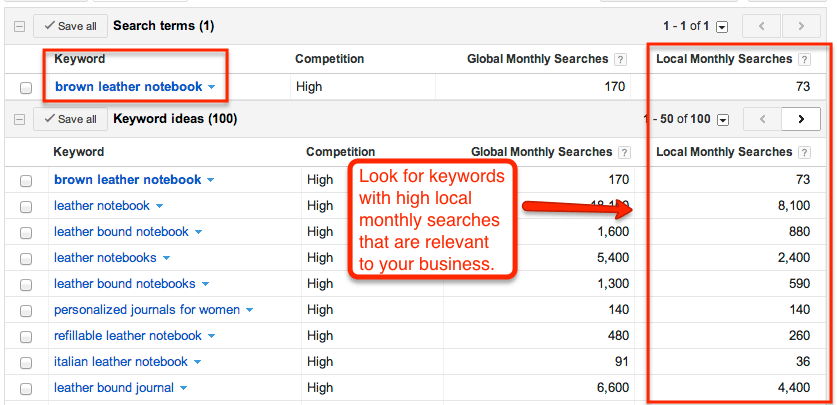
I suggest going for keywords that are highly relevant to your brand or products, that have a high exact match search volume (local, not global) in Google’s free AdWords Keyword tool, and that have a low difficulty score from Moz’s keyword tool.
search terms
Be careful to not choose keywords that are too broad or too competitive. If the match is too broad, you likely will end up with a high bounce rate and low conversion rate because of people clicking through to your site and not finding what they are looking for. Additionally, if you go after keywords with high competition, it will take a long time to achieve high rankings (if ever).
For example, if you manufacture “all natural” coffee filters, you should not go after broad keywords like “coffee,” “natural coffee,” or “organic coffee,” as these are not specific keywords for people who are looking for coffee filters. Also, those keywords have high competition, and your site probably won’t rank for them against large coffee manufacturers.

2. Pinpoint keywords for blog topics

Creating blog content can assist in ranking your e-commerce business for additional keywords that might not have a place on your main website. Plus, you can capitalize on long-tail keywords with your blog.
What are long-tail keywords anyway? These are unique searches that people use to find things online. They consist of more than one word.
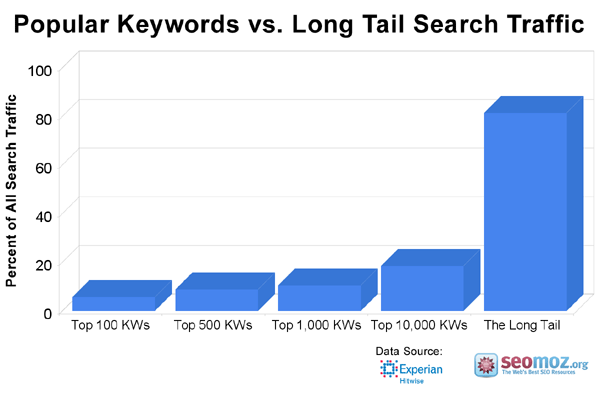
For example, it might sound like a good idea to try to rank for “coffee” if you sell coffee beans; however, the data shows that “popular” search terms like “coffee” make up “less than 30% of the searches performed on the web.” This is where long-tail keywords come into play.
popular keywords vs longtail traffic
According to Moz, “The remaining 70% lie in what’s called the ‘long tail’ of search. The long tail contains hundreds of millions of unique searches that might be conducted a few times in any given day, but, when taken together, they comprise the majority of the world’s demand for information through search engines.”
With this in mind, go after long-tail keywords that have a high exact match search volume (local, not global) and low difficulty score. After you have exhausted that list, you can start targeting lower volume keywords that still are highly relevant.
Note: You should never stuff any of your web pages or your blog posts with keywords. When writing for your blog, focus on developing great content on topics that people will want to read and share.
In essence, always write for people, not search engines. Google’s algorithm now rewards sites that create great content and penalizes sites that keyword stuff or use other tactics that can be seen as manipulative.

3. Avoid keyword cannibalization

Keyword cannibalization occurs when multiple pages of the same website are trying to rank for the same keyword.
In a post on On Page SEO, Sean Work from KISSmetrics notes “The problem with this is that it’s confusing to the search engines. You end up forcing them to choose which page is more important for that particular keyword out of the group of webpages. This weakens your ability to obtain traffic for that keyword.”
So, what does this mean? It means you should not even write a blog post using a keyword that you focused on for one of the pages on the main portion of your website.
In order to avoid keyword cannibalization, list each page of your website on a spreadsheet with the keywords you are trying to rank for. If you sort the keyword column, you should not see any doubling of exact keywords.

B: Competitor Research

After you’ve done keyword research, you’re half way there! Now it’s time to conduct competitor research. You should consider:

1. Which keywords are your main competitors going for?

Compile a list of keywords your competitors appear to be using with their SEO strategy. Also, you should look to see if they have a higher Domain Authority (DA)than you? Do their web pages have higher Page Authorities (PA) than you?
Luckily, Moz makes this really easy for you. You can find the information by installing the free Moz toolbar.
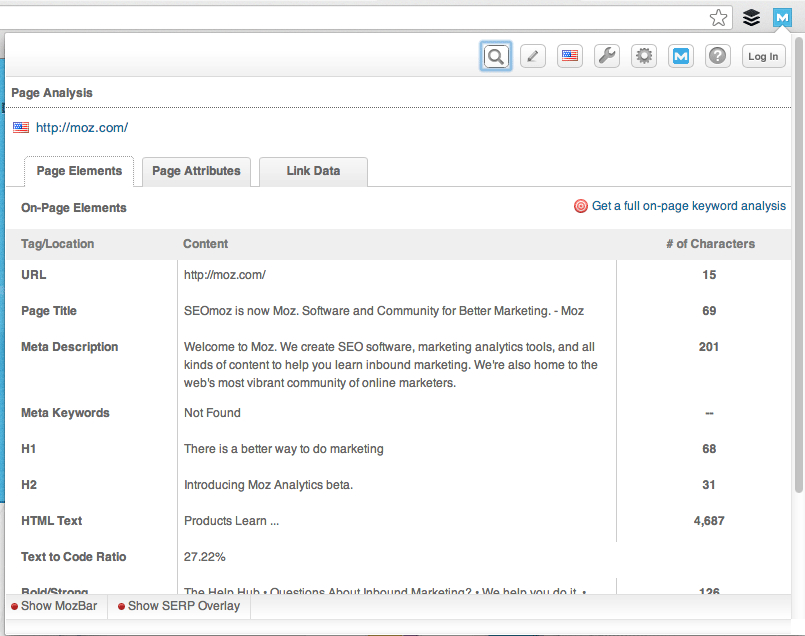
In the Page Elements tab, you’ll see meta data as well as header tags. It will look like this:
webpage analysis
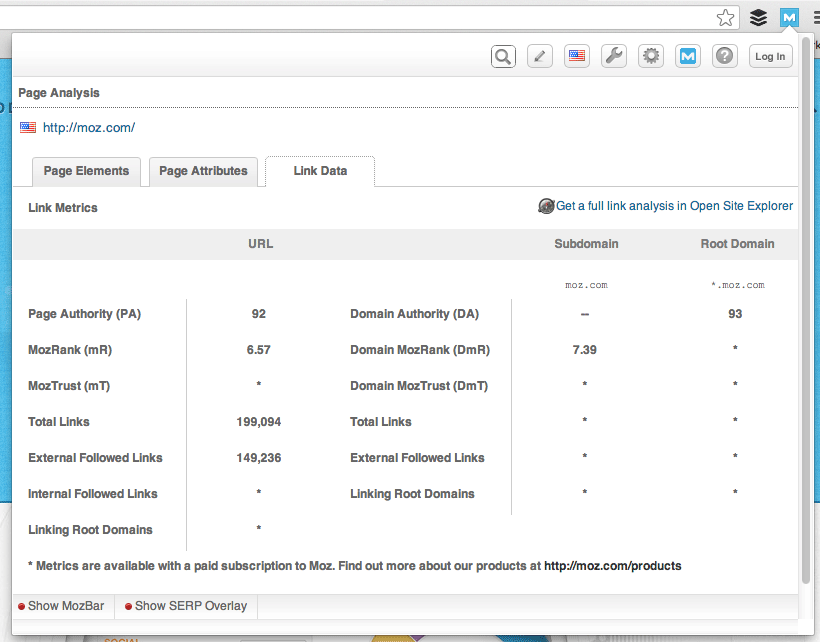
In the Link Data tab, you will see Page Authority and ranking information:
moz page analysis
If your competitors have significantly higher DA’s or PA’s than you, it may be a good idea to focus on other keywords, as competing against them will be very difficult. Try to go for easier wins, if you can!
To determine the DA or PA of any website or webpage, simply install the free Moz toolbar for Chrome or Firefox.

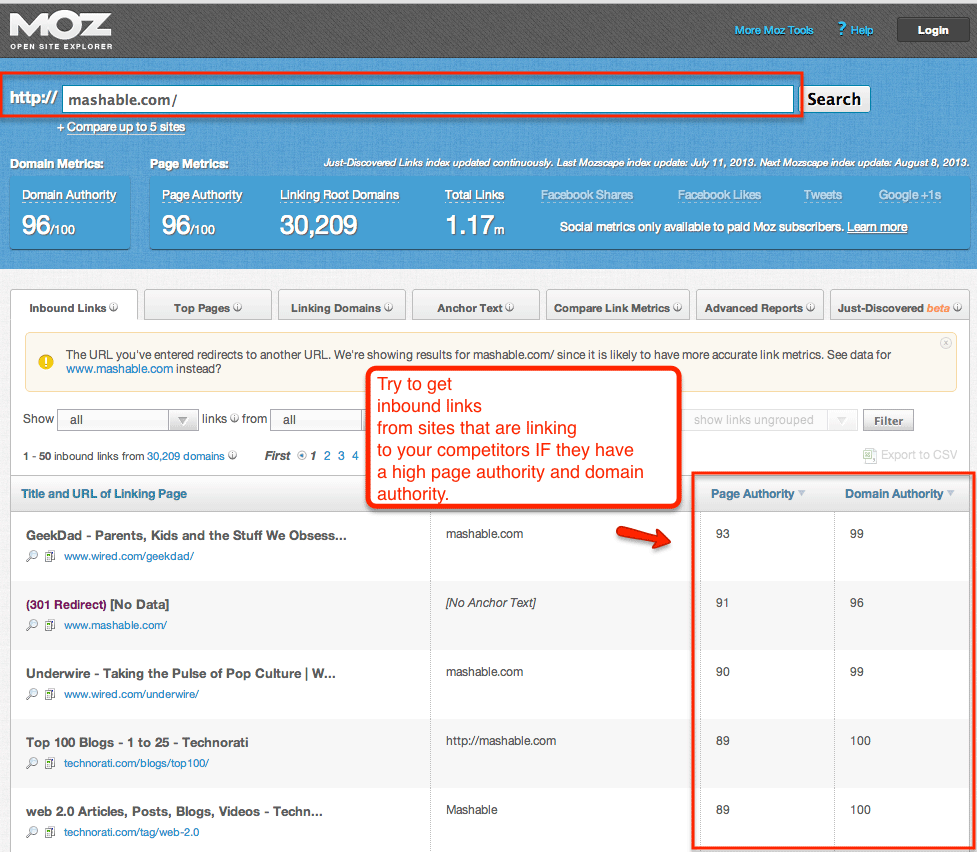
2. Where are they getting their links?

One really important thing to remember is to pull a list of the places your competitors are getting their inbound links.
To get this list, you can use a tool like Open Site Explorer:
 moz open site explorer
You can attempt to get a link from these sites as well through blogger outreach, press outreach, or setting up your own company pages. Don’t worry; there is more information on blogger and media outreach later in this guide!
Before reaching out to the sites on the list, first delete any site that has a low DA score. Getting an inbound link from a site with a low DA score actually can hurt your rankings as Google may suspect that a bad site is linking to you because you also have a bad site. Good to know, right?

3. What is their site architecture like?

Look at the site architecture of competing sites. What is their navigation like? How deep do their links go? E-commerce stores should pay special attention to the architecture for:
  • Popular products in a particular category
  • Related products
  • Top rated products
  • Recently viewed products
Once you have an idea of how the biggest companies within your industry organize their architecture, you can decide if you want to go the same route, follow the same route with modifications, or take a completely different route.
According to Moz in 2011, “most SEOs argue that pages buried very deeply in the architecture might not receive enough link juice to be visible in search engine rankings. Certainly, it remains true that by promoting content ‘up’ the architecture, you can improve its overall rank.”
So, if you see major competitors with deep navigational architecture, you should not copy them simply because they are a big brand.

4. From a strategy perspective, how can you differentiate your website?

This question ties in closely with what we’ve just discussed about site architecture. What can you do for your site that will make it different and better than your competitors? Can you improve the navigational architecture? How can you make your site more social? Will you add a blog if your competitors don’t have one? Make a list of actions you can take to ensure your site is better for consumers than theirs.

Part 2: Identifying Current Problems

After you have conducted your keyword and competitor research, it’s time to begin auditing your site for problems that need to be fixed. The top things we recommend focusing on in the auditing stage are:

A: Quickly Find Site Errors

I like to use Screaming Frog to find any website errors. Screaming Frog is free to use and will “spider your websites’ links, images, CSS, script and apps from an SEO perspective.” Then, it will provide you with a summary of data including errors, redirects, duplicate pages, missing header tags, and so on. Awesome!
The top errors you will want to correct quickly include:
  • Redirecting any 404 pages to actual content
  • Changing 302 redirects to 301 redirects
  • Updating duplicate content pages, meta titles, and meta descriptions
Screaming Frog will help you identify the above and many, many other site errors that will help improve your SEO and overall usability and conversion rate.

B: Determine Your Website Speed

Once you have taken care of the big errors, it’s time to focus on website speed.
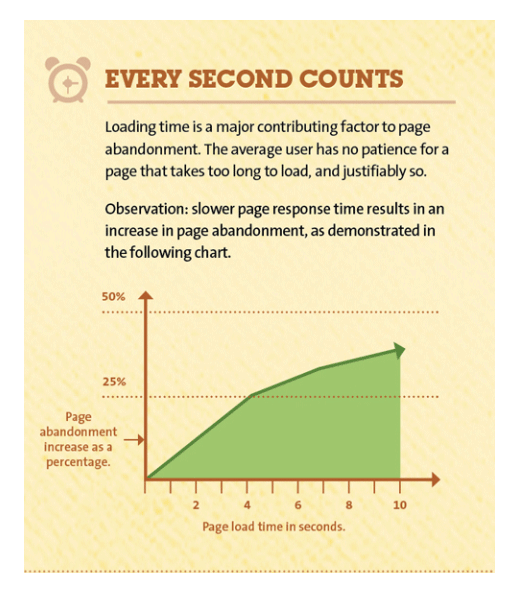
Visitors will not hang around and wait for a slow website to load. Your customers will click back to Google to find a faster website, which is likely to be a competitor!
In fact, research shows that 40% of people abandon a site that takes longer than 3 seconds to load! Don’t lose customers because your site is slow.
every second counts
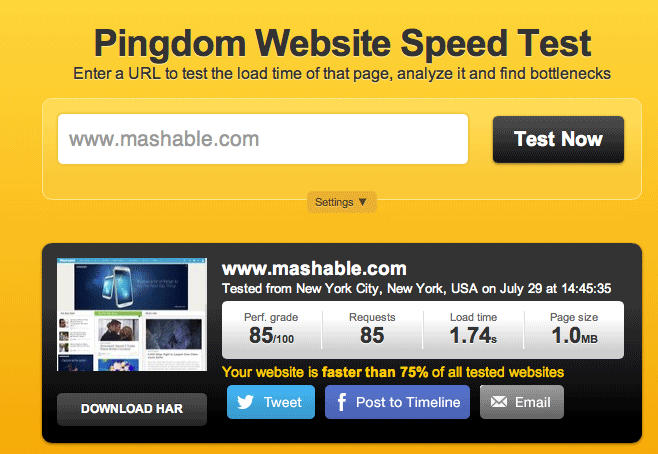
This is why it’s mega-important for your website to load quickly. If you need a way to test your website speed, use a free tool like Pingdom.
 pingdom website speed test
If it takes more than 3 seconds for your website to load, you can increase the speed by buying more server space, using a different CMS (for example, Magento is notoriously slow, whereas WooCommerce is known for being fast), or reducing image and file sizes.
In the example above, you can see that Mashable loads in under 2 seconds!
For more tips on increasing site speed, check out this post by Neil Patel.

Part 3: On-Page Optimization

While off-page search engine optimization (that is, link building) is important, on-page optimization is just as important. On-page optimization includes all of the actions you take within your own web pages to help your site rank better.
Think of on-page optimization as the low-hanging fruit in the SEO game. You can control this, which is great.
When it comes to on-page optimization, there are eight key targets you need to focus on:
  • Keyword Optimization
  • Site Structure
  • Internal Linking
  • Usability
  • Mobile Version of Website
  • Customer Reviews
  • Rich Snippets
  • Social Media Integration

A: Keyword Optimization

As mentioned earlier in this guide, you want to optimize your page and blog posts on your site for one keyword. In order to optimize a page, you need to ensure that page has the keyword in strategic locations, including:
  • The page title
  • Headers
  • Subheaders
  • Paragraph copy
  • Product descriptions
  • Image file names
  • Image alt tags
  • Meta title and description
  • URLs
When creating URLs, be sure they are user friendly. This means they should include real words (your keyword) and not a lot of numbers and gibberish.
Also, remember that your meta title and descriptions should not sound like gibberish or be packed with keywords either. They should read like an ad because the higher your click-through rate (CTR), the higher Google will place you in its results. Makes sense, right?
For example, when I search for “conference promotional products,” here are two listings that come up on the first page:
8 conf
9 conf
Which of these two descriptions would get YOU to click? The keyword stuffed one or the one that entices you with a benefit (that is, learning how promotional products can create a lasting impact on your company)? Once you break it down like this, on-page optimization begins to make a lot more sense.

B: Site Structure

If you’re building a website from the ground up or executing a re-design, information architecture is a must. We’ve talked a bit about architecture, but let’s dive in a bit deeper.
As you know, great architecture can dramatically affect your website’s usability, rankings, and conversions. In addition, proper planning will make expanding your product lines in the future a breeze. This is especially true with e-commerce websites because of the sheer size of the website.
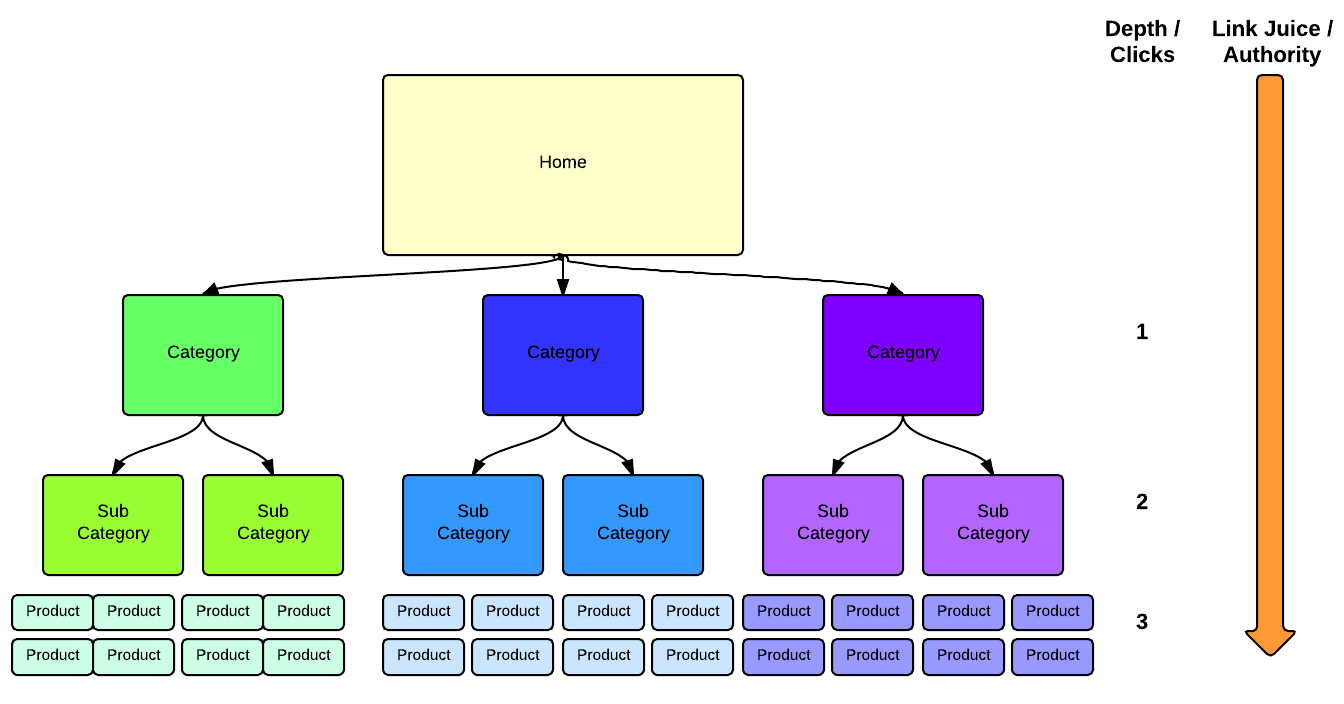
With usability in mind, use a tool like LucidChart to create a chart of your website’s information architecture.
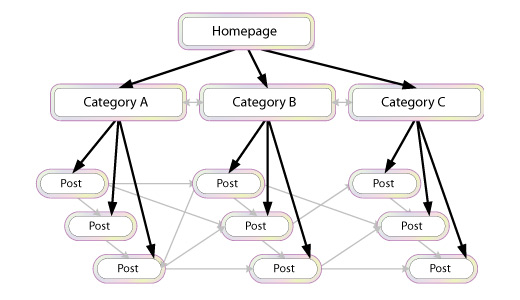
Focus on creating a “flat architecture” for your website, meaning design that requires as few clicks as possible to go from your home page to your product page. This way, the maximum amount of “link juice,” or authority, will pass from your home page to your product page via internal links.
website architecture
Then, take your findings from the keyword research you did at the beginning, and base your architecture on your targeted keywords in a way that still provides your customers and search engines a logical path from the home page to product pages.
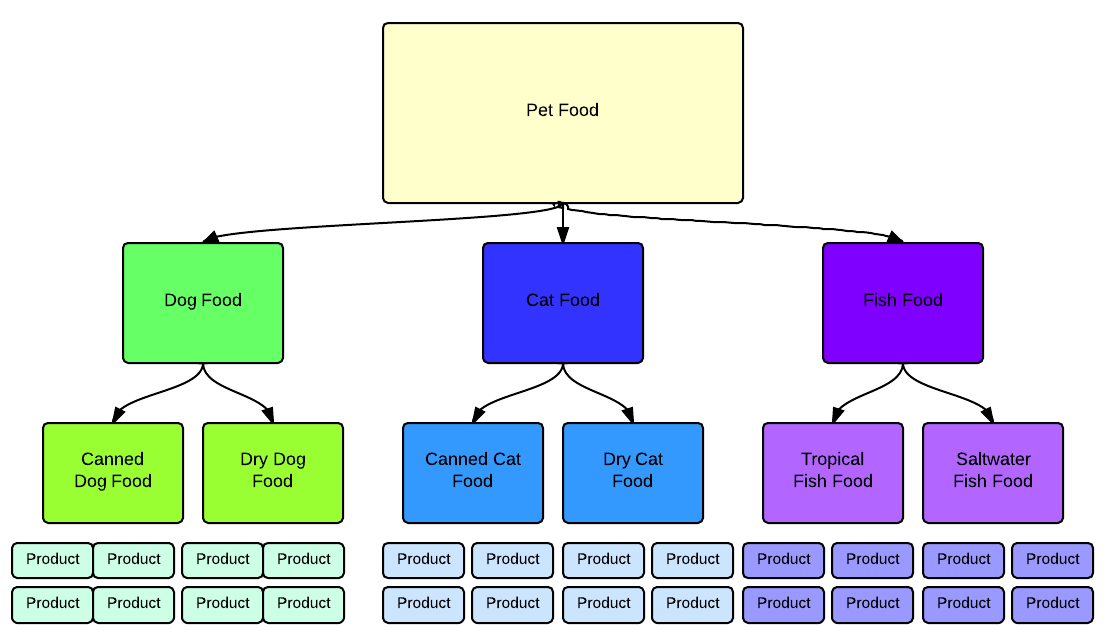
For example, if you run an online pet food store, your site structure could look like this:
pet food
Of course, these examples are very simple, and your website may be more complex. If you get totally stumped, reach out to the SEO community through a consultant, bloggers, or the Moz.com Q&A section to ensure you get it right the first time. There also are other in-depth information architecture guides that can be found herehere and here.
The layout illustrated above obviously has links from the home page down to the product page. It’s also helpful to link between pages and categories to distribute “link juice” to pages that have a higher priority for ranking. I’m sure you’re starting to get the picture now!

C: Internal Linking

The next step is internal linking. You might not have heard of this before, but I’m sure you know what it is. This is when you link pages of your website to other pages within your website.
Internal linking allows you to establish your own anchor text, which can help you with ranking for your top keywords.
site structure
However, when it comes to internal linking, you should be sure to use it somewhat sparingly. If you pack all of your pages with internal links, Google will think you are trying to do something suspicious. Google is smart and the algorithm will pick this up. Rather, you should place internal links only where it is natural to do so.
Additionally, don’t add a lot of links with the same exact anchor text. Google looks for anchor text variety from both inbound and internal links.
Finally, once you have completed your website, you should create and submit a sitemap to Google so it can crawl your entire website and index each page.

D: Usability

Usability is super-important for SEO and for making your site visitors happy. If your e-commerce site has great usability, your customers will start visiting your site repeatedly, which is the goal!
Great user experience means a website is easy to use, fun, and helpful. Great user experience also means your users will spend more time on your site.
Part of your usability testing should include making sure there are as few steps as possible in the checkout process, ensuring the checkout process works seamlessly, giving your visitor quick ways to contact you, making it simple for visitors to navigate to other important information, and guaranteeing your site loads quickly.
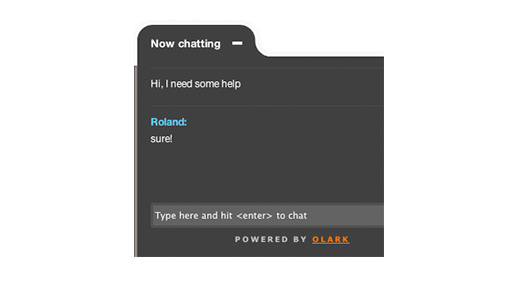
I often recommend using a live chat widget. This works well to lift conversion rates and also increases the average time on site per session, which is great for SEO purposes.
olark chat
If you’re looking for a live chat tool, check out Olark.

E: Mobile Version of Website

Do you know how hot mobile shopping is becoming? Many people are not only browsing the web, but also making purchases through mobile devices, which means it’s really important to have a mobile-friendly version of your site.
Need some convincing? Check out these stats:
  • 31% of mobile Internet users “mostly” go online using their phones (Pew, 2012)
  • 61% of customers who visit a mobile unfriendly site are likely to go to a competitor’s site (IAB)
  • 58% of mobile users expect mobile sites to load as quickly or faster than desktop sites (Google, 2011)
Many companies have had issues with the mobile versions of their websites. Because they produced duplicate content, it creates SEO problems and affects Google’s algorithm for your ranking.
With the advent of responsive website design, you can code a site so that it works on any device (desktop, tablet, mobile phone) without creating multiple sites. This is great news for e-commerce sites.
If you do not have a web developer on your staff, you can purchase and customize a responsive design template from Themeforest.net or any number of other template sites.
Themeforest has a particularly good selection of e-commerce templates.

F: Customer Reviews

Of course, a staple for any e-commerce site is customer reviews for each product.
According to Internet Retailer, you can increase your e-commerce conversion rateby 14-76% by adding product reviews to your online store. Jupiter Research also found that 77% of consumers read reviews before purchasing online.
In addition to increasing conversions, customer reviews also positively impact your SEO because more reviews = more content, and frequent reviews = fresh content, which Google loves to see.
To obtain more customer reviews, you can use a reward-based plugin like WooTheme’s Review for Discount option.
You also can send an email out a few days after you know a customer has received a product asking if they need any assistance, and, if not, would they please leave a review. Simple tricks like this will really help your SEO!

G: Rich Snippets

If you’ve used Google recently, you’ve probably noticed results looking like this:
14 rich snippet
Or this…
15 rich snippet
These are “rich snippets” and they have a huge impact on a website’s rankings.
There are types of rich snippets for authors, business information, events, music albums, people, products, recipes, reviews, and videos.
Rich snippets are HTML coded bits that tell search engines what searchers should be able to understand about your website before even clicking through to see it.
When people see results in Google with images, they’re more likely to click and convert into a customer.
To install rich snippets, follow these instructions:
  1. Get into your HTML of each page that you want rich snippets on.
  2. Add the microdata for the desired rich snippet. Read this guide from HubSpot to learn how to get the appropriate code. Then, publish the changes.
  3. Test to make sure it works here:http://www.google.com/webmasters/tools/richsnippets.

H: Social Media Integration

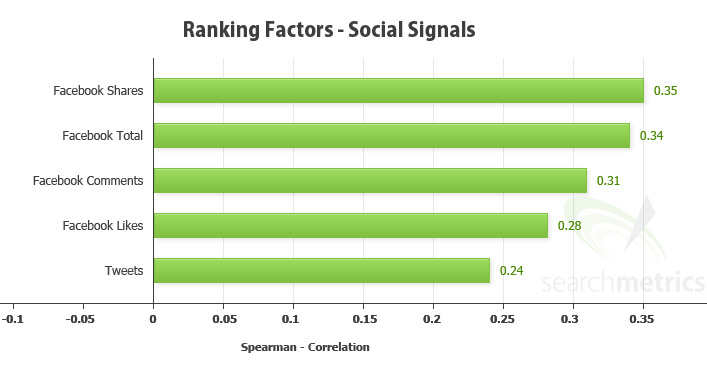
An e-commerce site wouldn’t be complete without social media! Social media signals (growing your community, engaging with customers, and sharing content)impact your SEO.
ranking factors
Having a lot of social signals tells Google that people find your website and brand valuable.
You can begin growing your social signals quickly by adding social buttons to your product pages, blog posts, and homepage.
According to Jayson DeMers at Forbes, “A branded social presence can help build word of mouth that gets you customers, mentions, and links.”
Perhaps the #1 social media channel you need to set up and engage on is Google+. Forbes says, “Google has been explicit that social signals play a role in its algorithm. Twitter and Facebook matter some, but many of the search results from both networks are restricted. Therefore, the network that carries the most weight is Google+.”

Part 4: Further Testing

After you have worked on your on-page SEO (including usability), it’s important to put a testing and optimization strategy in place.
You should:
  • Use analytics to see which keywords are converting the highest
  • Use PPC campaigns to find high-converting keywords you should add to your SEO strategy
  • Test meta titles and descriptions to increase click-throughs
  • A/B test page content to increase conversions from web traffic
Having a strong testing strategy in place will help your results continue to improve. Without constant iteration, your rankings could drop and you could be losing out on leads or sales due to a poor conversion rate.

Part 5: Adding Blog Content

As mentioned in Part 1: Research, keyword research is crucial to any SEO strategy. Since each page of your site should be optimized for only one keyword, there will be plenty of important keywords that don’t make it onto a page of your site.
The way to rank for those keywords is through a blog. With a blog, you can optimize each post for a keyword that you aren’t targeting with the main pages of your site.
As with your website pages, your blog posts need to be high quality and reader-friendly. You should hire an experienced, professional writer who not only understands your industry, but also has a basic knowledge of SEO.
If your posts are keyword stuffed or low quality, your customers will not read them and they certainly won’t share them. Also, as you know, Google will penalize you for keyword stuffing and you won’t earn any social signal points either.
When you’re creating blog content, consider packaging together various posts on the same theme into a downloadable eBook or guide.
Kyle Lacy, Senior Manager of Content Marketing and Research for ExactTarget says, “The contents of an eBook can be easily published in their entirety or as teaser content to drive more interaction, downloads, and overall interest in your eBook. Basically, when it comes to content marketing, your goal shouldn’t be to generate a ton of content, but rather use the content you create effectively.”
As an example, if you are an e-commerce business that sells jewelry, you might write a series of posts on how to select the perfect diamond for an engagement ring, how to finance the cost for the ring, and you might even include creative, romantic tips for a memorable proposal. Then, you could package those posts together into a downloadable eBook or guide.
The eBook or guide could be downloaded after buyers entered their email address into a lead generation form or landing page.
Later, you could send them a series of sales and marketing emails prompting the potential buyer to purchase the engagement ring from your store.
While you’re putting together this type of content marketing and email campaign, remember when it comes to writing any web content, always be thinking about quality!

Part 6: Link Building

Similar to content, you will want to concentrate on earning quality inbound links, when it comes to link building.
Not only will Google penalize your site if a lot of low quality sites are linking to you, but also the referral traffic won’t do anything positive for your business.
A low quality inbound link would be one from a low authority website. (Remember: you can use Moz’s toolbar to quickly see the authority level of any domain, as we discussed earlier!)
You usually can tell a low quality site just by looking at it. They tend to be full of ads and contain poorly written, keyword stuffed content.
Speaking of which, content farms (sites that accept guest posts from anyone about anything) usually will provide you with a low quality link. Google does not like content farms so stay away from them if you can!
Instead, focus on earning links from really good, high authority sites by offering something of value to them in exchange for a link.
You can do this by offering a high-quality guest post, providing a quote for a story, co-authoring a research study, putting together a great infographic, and so on.
Try using a free service like HARO (Help a Reporter Out) to find press opportunities.
Here are a few types of links best suited for e-commerce websites:
A quick note about broken link building: while it is an effective means for generating inbound links, it should be low on the prioritization checklist.
According to Dana Lookadoo, president of Yo! Yo! SEO:
“Broken link building is not a primary focus on a new SEO project, usually. An SEO audit would uncover needs, and from there a prioritization action list would be developed. Information architecture issues usually get priority and then a clean-up of any issues that affect the site’s authority and trust in the eyes on the search engines. Once the on-site SEO and content strategy are solid, then broken link building outreach can be considered as part of the off-site [link building] efforts.”
As you’re working through the above list of link building tasks, keep in mind that when it comes to link building, you should NOT:
  • Use the same anchor text repeatedly – go for variety
  • Link to the same page repeatedly – link to the most relevant page
  • Get links from low authority websites
Of course you won’t always be able to control the anchor text or which page is looked to, but that’s okay. This probably will lead to variety naturally.
If you have a close relationship with the website owner, you could kindly request specific anchor text, but otherwise you should just say thank you and not bug that person to change the anchor text or link. It’s better to establish positive relationships with high authority sites than to argue over one link, which alone will not hurt your SEO.

Part 7: Local Business Tips

Are you a local business? If you are a brick-and-mortar business, you will want to ensure you have your name, address, and phone number (NAP) for all locations showing on your website. You must use the same NAP formatting across all websites.
Additionally, you should submit your business to all of the major directories and as many niche directories as makes sense. (They must be relevant to your business.) You also should use location based keywords in your descriptions where appropriate.
All of this is very important because Google blends local and organic search rankings. According to Dr. Pete at Moz, there is an “opportunity for sites that might be weak on organic ranking factors” to be “decently optimized for local” nevertheless.
He also claims “there’s potential opportunity for some of the lower-ranking organic results to get promoted above other organic results by improving their local ranking factors.”

Get It Done!

There are many reasons you should optimize your site for search engines, but the bottom line is to increase sales.
When SEO is done right, you will see an increase in quality traffic, which will lead to more conversions and repeat visitors.
Before you get started, understand this: SEO work isn’t a one-time deal. Google and the other major search engines are updating their algorithms constantly in order to bring the best results to searchers. Because of this, you’ll need to stay on top of the updates and adjust your strategy accordingly.
There is no doubt that SEO work requires a lot of time and dedication, but the benefits are worth it, and I hope that this guide helps you get your SEO strategy in place to boost your sales from your e-commerce site!