Friday, 23 June 2017

How does Software and Hardware Load Balancer Work? (Loadbalancer Algorithms Explained with Examples)

When you have an enterprise application or website that gets lot of hits, your server might be under heavy load. In that case, you may want to consider distributing the load across multiple servers.
Load balancer will distribute the work-load of your system to multiple individual systems, or group of systems to to reduce the amount of load on an individual system, which in turn increases the reliability, efficiency and availability of your enterprise application or website.

In this article, we’ll cover the basics of software and hardware load balancer, and explain the various algorithms used by the load balancers.
The following are the advantages of load balancing your application:
  • Reduced the work-load on an individual server.
  • Large amount of work done in same time due to concurrency.
  • Increased performance of your application because of faster response.
  • No single point of failure. In a load balanced environment, if a server crashes the application is still up and served by the other servers in the cluster.
  • When appropriate load balancing algorithm is used, it brings optimal and efficient utilization of the resources, as it eliminates the scenario of some server’s resources are getting used than others.
  • Scalability: We can increase or decrease the number of servers on the fly without bringing down the application
  • Load balancing increases the reliability of your enterprise application
  • Increased security as the physical servers and IPs are abstract in certain cases.
On a high level, there are two types of load balancers, which implements different types of scheduling algorithms and routing mechanisms.
  1. Software load balancer
  2. Hardware load balancer

I. Software Load Balancers

Software load balancers generally implements a combination of one or more scheduling algorithms.
The following are the three different basic algorithms used by load balancers. Most modern load balancers use combination of these algorithms to reach high performance and to set a trade off between various parameters.

1. Weighted Scheduling Algorithm

Work is assigned to the server according to the weight assigned to the server. For different types of the server in the group different weights are assigned thus the load gets distributed.
The diagram below depicts a generic scenario where a load balancer is used and how the weighted scheduling will work if there are total of 10 request ( R1, R2…… R10 ) coming to the server farm/cluster.
As you see, the request will be assigned to the server as per its weight. This weight is determined by the administrators wisely by considering the hardware capabilities of each server. Assuming that we have different weights assigned to each server as you can see in the figure below.
The load balancer will compute the percentage of traffic to be sent to a particular server according to the weight assigned to it.
When is this algorithm mostly used?: This is used when there is a considerable difference between the capabilities and specification of the servers present in the farm or cluster.
This algorithm stands out to be efficient in managing the load without swarming the low capability servers the most and efficiently utilizing the available server resource at any instant of time.
Load Balancer - Weighted Scheduling Algorithm
Fig: Load Balancer – Weighted Scheduling Algorithm
The following points can be noted in the above diagram:
  • A load balancer can be of two types: hardware load balancer and software load balancer.
  • Software load balancer are often installed on the servers and consumes the processor and memory of the servers. So, in the diagram above software load balancer is over lapping the server farm.
  • Hard ware load balancers are specialized hardware deployed in-between server and the client. It can be a switching/routing hardware or even a dedicated system running a load balancing software with specialized capabilities.

2. Round Robin Scheduling

Requests are served by the server sequentially one after another. After sending the request to the last server, it starts from the first server again.
The diagram below depicts this approach. Sequentially each request gets assigned to each server one by one and the round goes on. The change in the request assigned can be easily understood by looking into the diagram below.
This algorithm is used when servers are of equal specification and there not much persistent connections.
Round Robin Load Balancer
Fig: Load Balancer – Round Robin Algorithm

3. Least Connection First Scheduling

Requests are served first to the server which is currently handling least number of persistent connections.
In the diagram above, if we are using the least connection first scheduling algorithm, the request R5 can be assigned randomly to any of the server as when R5 will be coming every server will be having same number of connections.
Lets say when request R5 comes, request R3 got completed and server S3 is free now. Then, in that case, the request R5 will be assigned to server S3 instead of any other server as server S3 is having least no of connection at that instant of time.
When is this algorithm used?: When we have large number of persistent connections in the traffic unevenly distributed between the servers. It is often coupled with Sticky Session or Session aware load balancing. In this, all the request related to a session is sent to the same server to maintain the session state and syncronization.
This approach is used when we have session aware write operations in sync with client and the server so that it avoids any inconsistency.
Now, load balancing softwares can have the smart implementation of the combination of the above three basic scheduling algorithm. Such implementations are Weighted round robin scheduling and Weighted least connection scheduling.
Many hybrid scheduling algorithm for load balancing has evolved using some variations or combinations of the above algorithms.

Software Load Balancer Examples

The following are few examples of software load balancers:
  1. HAProxy – A TCP load balancer.
  2. NGINX – A http load balancer with SSL termination support. (install Nginx on Linux)
  3. mod_athena – Apache based http load balancer.
  4. Varnish – A reverse proxy based load balancer.
  5. Balance – Open source TCP load balancer.
  6. LVS – Linux virtual server offering layer 4 load balancing

II. Hardware Load Balancers

Load balancing hardwares are often referred as specialized routers or switches which are deployed in between the servers and the client. It can also be a dedicated system in between the the client and the server to balance the load.
The hardware load balancers are implemented on Layer4 (Transport layer) and Layer7 (Application layer) of OSI model so prominent among these hardwares are L4-L7 routers.

1. Layer4 Hardware Load Balancing

These kind of load balancers work on transport layer of OSI model and make use of TCP, UDP and SCTP transport layer protocol details to make decision on which server the data is to be sent.
Layer 4 load balancers are mostly the network address translators (NATs) which shares load to the different servers getting translated to by these loadbalancer. These routers hide multiple servers behind them and translate every response data packets coming from the server to be coming from same ipaddress.
Similarly, when there is a request they reverse translate the request using the mapping table and distributes it among the multiple servers.
DNS load balancing: In DNS based load balancing method the Domain Name Servers are configured to return different ipaddress for different systems. This approach creates a load balancing effect whenever there is a dns lookup.
The diagram below depicts the highlevel overview of Layer 4 and Layer 7 load balancer working and techniques on OSI layer.
OSI Layer - Load Balancer
Fig: Load Balancer – Layer 4 and Layer 7
Direct routing: This is a yet another configuration of hardware load balancing where the routers are aware of the server mac addresses and server may be ARP( Address resolution Protocol) disabled.
In direct routing, it is direct in the sense that all the income traffic is routed by the load balancer however all the outgoing traffic direct reaches the client which makes it super fast load balancing configuration.
Tunnel or a IP tunneling often looks like Direct routing where response is directly sent to client however the traffic between the router and the server can be routed.
In this, client sends the request to the virtual IP of load balancer which further encapsulates the IP packets, keeps a hast table and distributes it to the different servers as per the configured load balancing technique.
When the server is getting back the response, it decapsulates it and send back to the client directly according to the hash table which it has stored. This record is eventually removed from hash table when the connection is closed or there is a timeout.

2. Layer7 Hardware Load Balancing

This type of load balancers makes the decision according to the actual content of the message (URLs, cookies, scripts) since HTTP exists on the layer7.
These layer7 hardware actually form a ADN (Application delivery network) and they pass-on request to the servers as per the type of the content.
For example, the request for image will go to an image server, request for PHP scripts may to another server, HTML, js and css like static content may go to another one and request to any media content may go to yet another server.
So, here a load balancing effect is achieved by distributing load according to the type to content requested.
For this, it is also very helpful to understand the fundamentals of TCP/IP Protocol with the different layers.
The diagram below depicts a Layer7 load balancer.
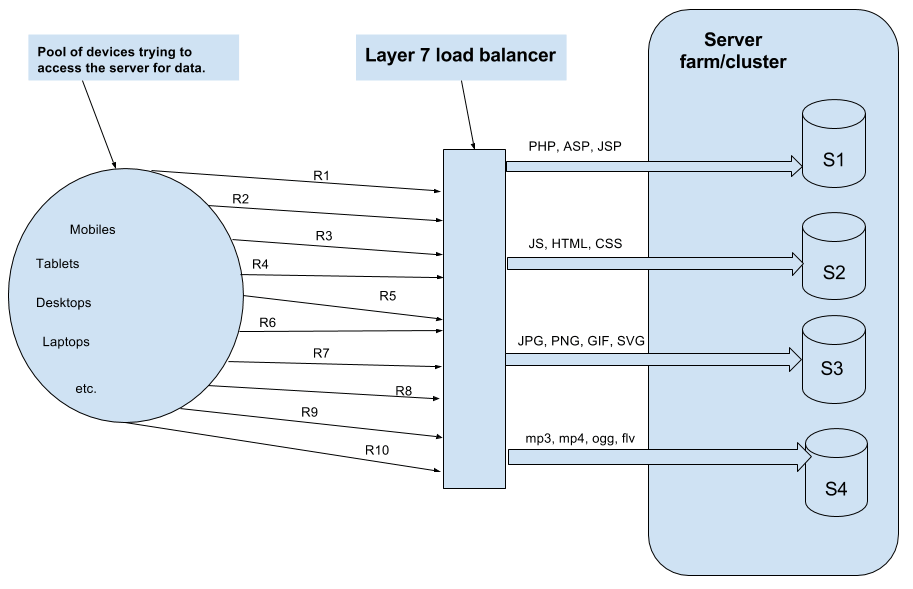
Layer 7 Load Balancer
Fig: Load Balancer – Layer 7
Layer 7 load balancing uses the following three techniques:
  1. URL parsing: From this they come to know about different type of contents.
  2. Cookie sniffing: This helps them for a session aware routing.
  3. HTTP reading: This method looks for http header information.

Hardware Load Balancer Examples

  1. F5 BIG-IP load balancer (Setup HTTPS load balance on F5)
  2. CISCO system catalyst
  3. Barracuda load balancer
  4. Coytepoint load balancer

Thursday, 22 June 2017

5 Common Server Setups For Your Web Application

Introduction

When deciding which server architecture to use for your environment, there are many factors to consider, such as performance, scalability, availability, reliability, cost, and ease of management.
Here is a list of commonly used server setups, with a short description of each, including pros and cons. Keep in mind that all of the concepts covered here can be used in various combinations with one another, and that every environment has different requirements, so there is no single, correct configuration.

1. Everything On One Server

The entire environment resides on a single server. For a typical web application, that would include the web server, application server, and database server. A common variation of this setup is a LAMP stack, which stands for Linux, Apache, MySQL, and PHP, on a single server.
Use Case: Good for setting up an application quickly, as it is the simplest setup possible, but it offers little in the way of scalability and component isolation.
Everything On a Single Server
Pros:
  • Simple
Cons:
  • Application and database contend for the same server resources (CPU, Memory, I/O, etc.) which, aside from possible poor performance, can make it difficult to determine the source (application or database) of poor performance
  • Not readily horizontally scalable
Related Tutorials:

2. Separate Database Server

The database management system (DBMS) can be separated from the rest of the environment to eliminate the resource contention between the application and the database, and to increase security by removing the database from the DMZ, or public internet.
Use Case: Good for setting up an application quickly, but keeps application and database from fighting over the same system resources.
Separate Database Server
Pros:
  • Application and database tiers do not contend for the same server resources (CPU, Memory, I/O, etc.)
  • You may vertically scale each tier separately, by adding more resources to whichever server needs increased capacity
  • Depending on your setup, it may increase security by removing your database from the DMZ
Cons:
  • Slightly more complex setup than single server
  • Performance issues can arise if the network connection between the two servers is high-latency (i.e. the servers are geographically distant from each other), or the bandwidth is too low for the amount of data being transferred
Related Tutorials:

3. Load Balancer (Reverse Proxy)

Load balancers can be added to a server environment to improve performance and reliability by distributing the workload across multiple servers. If one of the servers that is load balanced fails, the other servers will handle the incoming traffic until the failed server becomes healthy again. It can also be used to serve multiple applications through the same domain and port, by using a layer 7 (application layer) reverse proxy.
Examples of software capable of reverse proxy load balancing: HAProxy, Nginx, and Varnish.
Use Case: Useful in an environment that requires scaling by adding more servers, also known as horizontal scaling.
Load Balancer
Pros:
  • Enables horizontal scaling, i.e. environment capacity can be scaled by adding more servers to it
  • Can protect against DDOS attacks by limiting client connections to a sensible amount and frequency
Cons:
  • The load balancer can become a performance bottleneck if it does not have enough resources, or if it is configured poorly
  • Can introduce complexities that require additional consideration, such as where to perform SSL termination and how to handle applications that require sticky sessions
  • The load balancer is a single point of failure; if it goes down, your whole service can go down. A high availability (HA) setup is an infrastructure without a single point of failure. To learn how to implement an HA setup, you can read this section of How To Use Floating IPs.
Related Tutorials:

4. HTTP Accelerator (Caching Reverse Proxy)

An HTTP accelerator, or caching HTTP reverse proxy, can be used to reduce the time it takes to serve content to a user through a variety of techniques. The main technique employed with an HTTP accelerator is caching responses from a web or application server in memory, so future requests for the same content can be served quickly, with less unnecessary interaction with the web or application servers.
Examples of software capable of HTTP acceleration: Varnish, Squid, Nginx.
Use Case: Useful in an environment with content-heavy dynamic web applications, or with many commonly accessed files.
HTTP Accelerator
Pros:
  • Increase site performance by reducing CPU load on web server, through caching and compression, thereby increasing user capacity
  • Can be used as a reverse proxy load balancer
  • Some caching software can protect against DDOS attacks
Cons:
  • Requires tuning to get best performance out of it
  • If the cache-hit rate is low, it could reduce performance
Related Tutorials:

5. Master-Slave Database Replication

One way to improve performance of a database system that performs many reads compared to writes, such as a CMS, is to use master-slave database replication. Master-slave replication requires a master and one or more slave nodes. In this setup, all updates are sent to the master node and reads can be distributed across all nodes.
Use Case: Good for increasing the read performance for the database tier of an application.
Here is an example of a master-slave replication setup, with a single slave node:
Master-Slave Database Replication
Pros:
  • Improves database read performance by spreading reads across slaves
  • Can improve write performance by using master exclusively for updates (it spends no time serving read requests)
Cons:
  • The application accessing the database must have a mechanism to determine which database nodes it should send update and read requests to
  • Updates to slaves are asynchronous, so there is a chance that their contents could be out of date
  • If the master fails, no updates can be performed on the database until the issue is corrected
  • Does not have built-in failover in case of failure of master node
Related Tutorials:

Example: Combining the Concepts

It is possible to load balance the caching servers, in addition to the application servers, and use database replication in a single environment. The purpose of combining these techniques is to reap the benefits of each without introducing too many issues or complexity. Here is an example diagram of what a server environment could look like:
Load Balancer, HTTP Accelerator, and Database Replication Combined
Let's assume that the load balancer is configured to recognize static requests (like images, css, javascript, etc.) and send those requests directly to the caching servers, and send other requests to the application servers.
Here is a description of what would happen when a user sends a requests dynamic content:
  1. The user requests dynamic content from http://example.com/ (load balancer)
  2. The load balancer sends request to app-backend
  3. app-backend reads from the database and returns requested content to load balancer
  4. The load balancer returns requested data to the user
If the user requests static content:
  1. The load balancer checks cache-backend to see if the requested content is cached (cache-hit) or not (cache-miss)
  2. If cache-hit: return the requested content to the load balancer and jump to Step 7. If cache-miss: the cache server forwards the request to app-backend, through the load balancer
  3. The load balancer forwards the request through to app-backend
  4. app-backend reads from the database then returns requested content to the load balancer
  5. The load balancer forwards the response to cache-backend
  6. cache-backend caches the content then returns it to the load balancer
  7. The load balancer returns requested data to the user
This environment still has two single points of failure (load balancer and master database server), but it provides the all of the other reliability and performance benefits that were described in each section above.

Conclusion

Now that you are familiar with some basic server setups, you should have a good idea of what kind of setup you would use for your own application(s). If you are working on improving your own environment, remember that an iterative process is best to avoid introducing too many complexities too quickly.
Let us know of any setups you recommend or would like to learn more about in the comments below!

How To Install Linux, Apache, MySQL, PHP (LAMP) stack On CentOS 6

Which package we should choose to install  LAMP.
There are comparatively more distributions or versions of Linux operating systems. The distributions available for Linux are as follows:
  • Redhat
  • Kali
  • Slackware
  • Debian
  • ArchLinux
  • Solaris
  • Ubuntu
  • CentOS
  • Fedora


While their functionality and benefits are broadly similar, packaging formats and tools vary by platform:
Operating SystemFormatTool(s)
Debian.debaptapt-cacheapt-getdpkg
Ubuntu.debaptapt-cacheapt-getdpkg
CentOS.rpmyum
Fedora.rpmdnf
FreeBSDPorts, .txzmakepkg
CentOS, Fedora, and other members of the Red Hat family use RPM files. In CentOS, yum is used to interact with both individual package files and repositories.


Step One—Install Apache

Apache is a free open source software which runs over 50% of the world’s web servers.
To install apache, open terminal and type in this command:
sudo yum install httpd
Once it installs, you can start apache running on your VPS:
sudo service httpd start
That’s it. To check if Apache is installed, direct your browser to your server’s IP address (eg. http://12.34.56.789). The page should display the words “It works!" like this.


How to find your Server’s IP address

You can run the following command to reveal your server’s IP address.
ifconfig eth0 | grep inet | awk '{ print $2 }'


Step Two—Install MySQL

MySQL is a powerful database management system used for organizing and retrieving data on a virtual server
To install MySQL, open terminal and type in these commands:
sudo yum install mysql-server
sudo service mysqld start
During the installation, MySQL will ask you for your permission twice. After you say Yes to both, MySQL will install.
Once it is done installing, you can set a root MySQL password:
sudo /usr/bin/mysql_secure_installation
The prompt will ask you for your current root password.
Since you just installed MySQL, you most likely won’t have one, so leave it blank by pressing enter.
Enter current password for root (enter for none): 
OK, successfully used password, moving on...
Then the prompt will ask you if you want to set a root password. Go ahead and choose Y and follow the instructions.
CentOS automates the process of setting up MySQL, asking you a series of yes or no questions.
It’s easiest just to say Yes to all the options. At the end, MySQL will reload and implement the new changes.
By default, a MySQL installation has an anonymous user, allowing anyone
to log into MySQL without having to have a user account created for
them.  This is intended only for testing, and to make the installation
go a bit smoother.  You should remove them before moving into a
production environment.

Remove anonymous users? [Y/n] y                                            
 ... Success!

Normally, root should only be allowed to connect from 'localhost'.  This
ensures that someone cannot guess at the root password from the network.

Disallow root login remotely? [Y/n] y
... Success!

By default, MySQL comes with a database named 'test' that anyone can
access.  This is also intended only for testing, and should be removed
before moving into a production environment.

Remove test database and access to it? [Y/n] y
 - Dropping test database...
 ... Success!
 - Removing privileges on test database...
 ... Success!

Reloading the privilege tables will ensure that all changes made so far
will take effect immediately.

Reload privilege tables now? [Y/n] y
 ... Success!

Cleaning up...

All done!  If you've completed all of the above steps, your MySQL
installation should now be secure.

Thanks for using MySQL!

Step Three—Install PHP

PHP is an open source web scripting language that is widely used to build dynamic webpages.
To install PHP on your virtual private server, open terminal and type in this command:
sudo yum install php php-mysql
Once you answer yes to the PHP prompt, PHP will be installed.

PHP Modules

PHP also has a variety of useful libraries and modules that you can add onto your server. You can see the libraries that are available by typing:
yum search php-
Terminal then will display the list of possible modules. The beginning looks like this:
php-bcmath.x86_64 : A module for PHP applications for using the bcmath library
php-cli.x86_64 : Command-line interface for PHP
php-common.x86_64 : Common files for PHP
php-dba.x86_64 : A database abstraction layer module for PHP applications
php-devel.x86_64 : Files needed for building PHP extensions
php-embedded.x86_64 : PHP library for embedding in applications
php-enchant.x86_64 : Human Language and Character Encoding Support
php-gd.x86_64 : A module for PHP applications for using the gd graphics library
php-imap.x86_64 : A module for PHP applications that use IMAP
To see more details about what each module does, type the following command into terminal, replacing the name of the module with whatever library you want to learn about.
yum info name of the module
Once you decide to install the module, type:
sudo yum install name of the module
You can install multiple libraries at once by separating the name of each module with a space.
Congratulations! You now have LAMP stack on your droplet!
We should also set the processes to run automatically when the server boots (php will run automatically once Apache starts):
sudo chkconfig httpd on
sudo chkconfig mysqld on


Monday, 5 June 2017

Web Services Architecture – When to Use SOAP vs REST


This article, based on my experience, will discuss when to use SOAP or REST web services to expose your API to third party clients.

Based on the above definition, one can insinuate when SOAP should be used instead of REST and vice-versa but it is not as simple as it looks. We can agree that Web Services are not the same as Web API. Accessing an image over the web is not calling a web service but retrieving a web resources using is Universal Resource Identifier. HTML has a well-defined standard approach to serving resources to clients and does not require the use of web service in order to fulfill their request.

REST is easier than SOAP


I'm not sure what developers refer to when they argue that REST is easier than SOAP. Based on my experience, depending on the requirement, developing REST services can quickly become very complex just as any other SOA projects. What is your service abstracting from the client? What is the level of security required? Is your service a long running asynchronous process? And many other requirements will increase the level of complexity. Testability: apparently it easier to test RESTFul web services than their SOAP counter parts. This is only partially true; for simple REST services, developers only have to point their browser to the service endpoints and a result would be returned in the response. But what happens once you need to add the HTTP headers and passing of tokens, parameters validation… This is still testable but chances are you will require a plugin for your browser in order to test those features. If a plugin is required then the ease of testing is exactly the same as using SOAPUI for testing SOAP based services.

REST is built for the Web

Well this is true according to Roy Fielding dissertation; after all he is credited with the creation of REST style architecture. REST, unlike SOAP, uses the underlying technology for transport and communication between clients and servers. The architecture style is optimized for the modern web architecture. The web has outgrown is initial requirements and this can be seen through HTML5 and web sockets standardization. The web has become a platform on its own right, maybe WebOS. Some applications will require server-side state saving such as financial applications to e-commerce.

Caching

When using REST over HTTP, it will utilize the features available in HTTP such as caching, security in terms of TLS and authentication. Architects know that dynamic resources should not be cached. Let's discuss this with an example; we have a RESTFul web service to serve us some stock quotes when provided with a stock ticker. Stock quotes changes per milliseconds, if we make a request for BARC (Barclays Bank), there is a chance that the quote that we have receive a minute ago would be different in two minutes. This shows that we cannot always use the caching features implemented in the protocol. HTTP Caching be useful in client requests of static content but if the caching feature of HTTP is not enough for your requirements, then you should also evaluate SOAP as you will be building your own cache either way not relying on the protocol.

HTTP Verb Binding

HTTP verb binding is supposedly a feature worth discussing when comparing REST vs SOAP. Much of public facing API referred to as RESTFul are more REST-like and do not implement all HTTP verb in the manner they are supposed to. For example; when creating new resources, most developers use POST instead of PUT. Even deleting resources are sent through POST request instead of DELETE.
SOAP also defines a binding to the HTTP protocol. When binding to HTTP, all SOAP requests are sent through POST request.

Security

Security is never mentioned when discussing the benefits of REST over SOAP. Two simples security is provided on the HTTP protocol layer such as basic authentication and communication encryption through TLS. SOAP security is well standardized through WS-SECURITY. HTTP is not secured, as seen in the news all the time, therefore web services relying on the protocol needs to implement their own rigorous security. Security goes beyond simple authentication and confidentiality, and also includes authorization and integrity. When it comes to ease of implementation, I believe that SOAP is that at the forefront.

Conclusion

This was meant to be a short blog post but it seems we got to passionate about the subject.
I accept that there are many other factors to consider when choosing SOAP vs REST but I will over simplify it here. For machine-to-machine communications such as business processing with BPEL, transaction security and integrity, I suggest using SOAP. SOAP binding to HTTP is possible and XML parsing is not noticeably slower than JSON on the browser. For building public facing API, REST is not the undisputed champion. Consider the actual application requirements and evaluate the benefits. People would say that REST protocol agnostic and work on anything that has URI is beside the point. According to its creator, REST was conceived for the evolution of the web. Most so-called RESTFul web services available on the internet are more truly REST-like as they do not follow the principle of the architectural style. One good thing about working with REST is that application do not need a service contract a la SOAP (WSDL). WADL was never standardized and I do not believe that developers would implement it. I remember looking for Twitter WADL to integrate it.