There’s no question that ranking higher than your competitors on Google is a must. But, what if you don’t know the SEO tips and tricks that will get your e-commerce site to the top? If you’re missing out on clicks, you’re probably also missing out on sales.
Whether you’re just getting started with a new website or improving an existing site, this complete guide provides useful tactical suggestions for stepping up your SEO game.
These days, reaching the first page isn’t enough. You must rank #1.
In 2011, Search Engine Watch reported that a research study by Optify discovered that “websites ranked number one received an average click-through rate (CTR) of 36.4 percent; number two had a CTR of 12.5 percent; and number three had a CTR of 9.5 percent.”
Another study by Gabe Donnini at Marketing Land last year supported Optify’s findings. It showed that “the share of impressions coming from the first position is almost double that for the second position, truly illustrating the value the first spot holds.”
What does this mean in layman’s terms? If you don’t have a strong SEO strategy in place, you are losing out on brand impressions, clicks, and sales.
Do you want to know how to rank your e-commerce site? Read this step-by-step guide, and you’ll be on your way to becoming an SEO savvy business owner or marketer.
Part 1: Research
Before you begin any SEO work (on-site or off-site), you need to start with research – keyword research and competitor research.
Why?
Research is the most important piece of SEO. Targeting the wrong keywords can ruin your campaign by generating low quality traffic and few conversions, and no business wants that!
A: Keyword Research
There are three primary areas you need to focus on when conducting keyword research:
1. Find keywords for your homepage and product pages
When it comes to optimizing the most important pages of your website, you should consider relevancy, search volume, and ranking difficulty.
I suggest going for keywords that are highly relevant to your brand or products, that have a high exact match search volume (local, not global) in Google’s free AdWords Keyword tool, and that have a low difficulty score from Moz’s keyword tool.
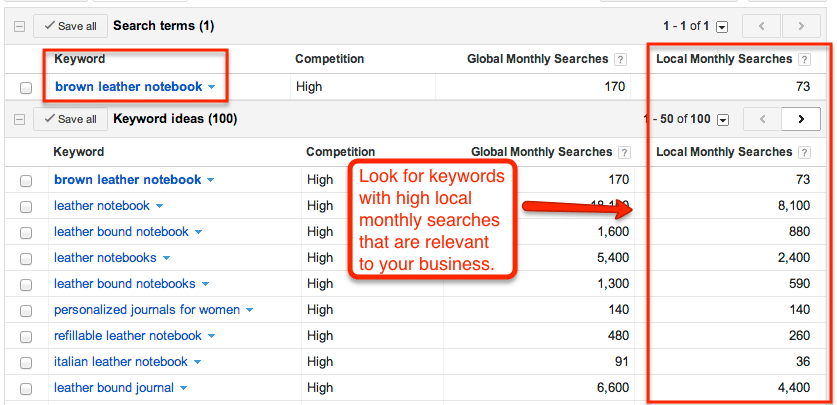
Be careful to not choose keywords that are too broad or too competitive. If the match is too broad, you likely will end up with a high bounce rate and low conversion rate because of people clicking through to your site and not finding what they are looking for. Additionally, if you go after keywords with high competition, it will take a long time to achieve high rankings (if ever).
For example, if you manufacture “all natural” coffee filters, you should not go after broad keywords like “coffee,” “natural coffee,” or “organic coffee,” as these are not specific keywords for people who are looking for coffee filters. Also, those keywords have high competition, and your site probably won’t rank for them against large coffee manufacturers.
2. Pinpoint keywords for blog topics
Creating blog content can assist in ranking your e-commerce business for additional keywords that might not have a place on your main website. Plus, you can capitalize on long-tail keywords with your blog.
What are long-tail keywords anyway? These are unique searches that people use to find things online. They consist of more than one word.
For example, it might sound like a good idea to try to rank for “coffee” if you sell coffee beans; however, the data shows that “popular” search terms like “coffee” make up “less than 30% of the searches performed on the web.” This is where long-tail keywords come into play.
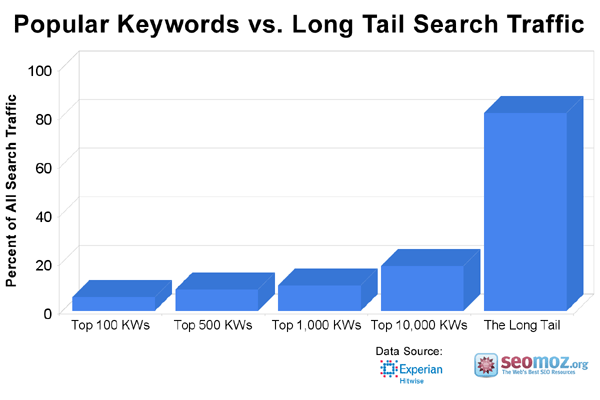
According to Moz, “The remaining 70% lie in what’s called the ‘long tail’ of search. The long tail contains hundreds of millions of unique searches that might be conducted a few times in any given day, but, when taken together, they comprise the majority of the world’s demand for information through search engines.”
With this in mind, go after long-tail keywords that have a high exact match search volume (local, not global) and low difficulty score. After you have exhausted that list, you can start targeting lower volume keywords that still are highly relevant.
Note: You should never stuff any of your web pages or your blog posts with keywords. When writing for your blog, focus on developing great content on topics that people will want to read and share.
In essence, always write for people, not search engines. Google’s algorithm now rewards sites that create great content and penalizes sites that keyword stuff or use other tactics that can be seen as manipulative.
3. Avoid keyword cannibalization
Keyword cannibalization occurs when multiple pages of the same website are trying to rank for the same keyword.
In a post on On Page SEO, Sean Work from KISSmetrics notes “The problem with this is that it’s confusing to the search engines. You end up forcing them to choose which page is more important for that particular keyword out of the group of webpages. This weakens your ability to obtain traffic for that keyword.”
So, what does this mean? It means you should not even write a blog post using a keyword that you focused on for one of the pages on the main portion of your website.
In order to avoid keyword cannibalization, list each page of your website on a spreadsheet with the keywords you are trying to rank for. If you sort the keyword column, you should not see any doubling of exact keywords.
B: Competitor Research
After you’ve done keyword research, you’re half way there! Now it’s time to conduct competitor research. You should consider:
1. Which keywords are your main competitors going for?
Compile a list of keywords your competitors appear to be using with their SEO strategy. Also, you should look to see if they have a higher Domain Authority (DA)than you? Do their web pages have higher Page Authorities (PA) than you?
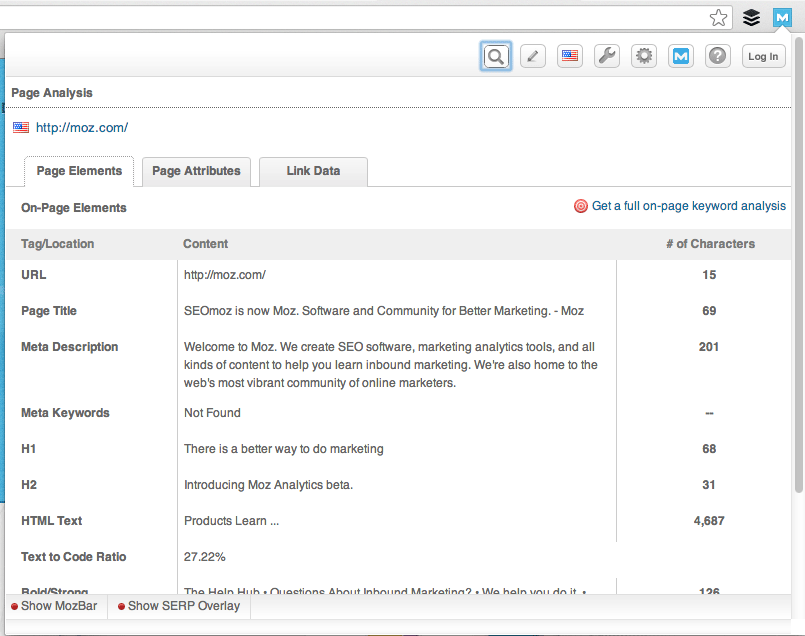
Luckily, Moz makes this really easy for you. You can find the information by installing the free Moz toolbar.
In the Page Elements tab, you’ll see meta data as well as header tags. It will look like this:
In the Link Data tab, you will see Page Authority and ranking information:
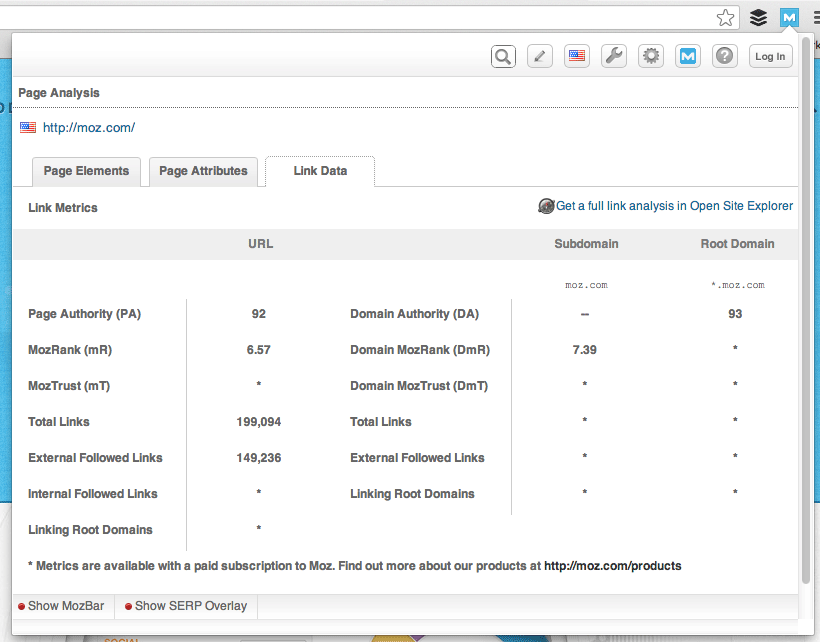
If your competitors have significantly higher DA’s or PA’s than you, it may be a good idea to focus on other keywords, as competing against them will be very difficult. Try to go for easier wins, if you can!
To determine the DA or PA of any website or webpage, simply install the free Moz toolbar for Chrome or Firefox.
2. Where are they getting their links?
One really important thing to remember is to pull a list of the places your competitors are getting their inbound links.
To get this list, you can use a tool like Open Site Explorer:
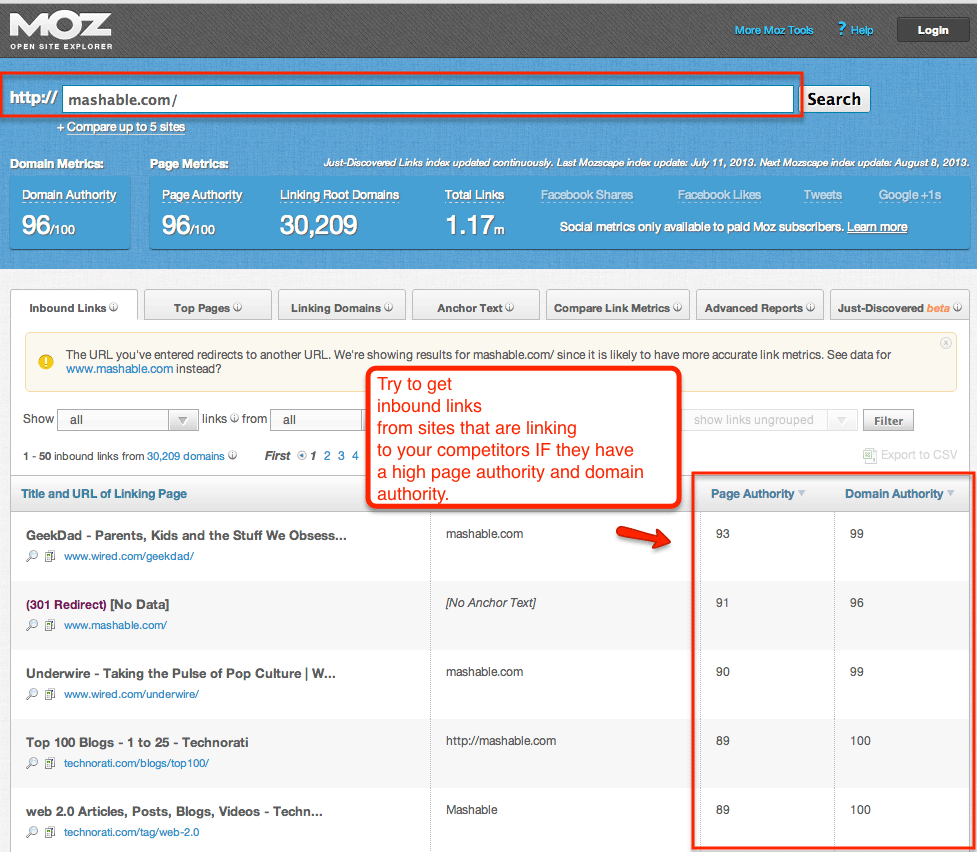
You can attempt to get a link from these sites as well through blogger outreach, press outreach, or setting up your own company pages. Don’t worry; there is more information on blogger and media outreach later in this guide!
Before reaching out to the sites on the list, first delete any site that has a low DA score. Getting an inbound link from a site with a low DA score actually can hurt your rankings as Google may suspect that a bad site is linking to you because you also have a bad site. Good to know, right?
3. What is their site architecture like?
Look at the site architecture of competing sites. What is their navigation like? How deep do their links go? E-commerce stores should pay special attention to the architecture for:
- Popular products in a particular category
- Related products
- Top rated products
- Recently viewed products
Once you have an idea of how the biggest companies within your industry organize their architecture, you can decide if you want to go the same route, follow the same route with modifications, or take a completely different route.
According to Moz in 2011, “most SEOs argue that pages buried very deeply in the architecture might not receive enough link juice to be visible in search engine rankings. Certainly, it remains true that by promoting content ‘up’ the architecture, you can improve its overall rank.”
So, if you see major competitors with deep navigational architecture, you should not copy them simply because they are a big brand.
4. From a strategy perspective, how can you differentiate your website?
This question ties in closely with what we’ve just discussed about site architecture. What can you do for your site that will make it different and better than your competitors? Can you improve the navigational architecture? How can you make your site more social? Will you add a blog if your competitors don’t have one? Make a list of actions you can take to ensure your site is better for consumers than theirs.
Part 2: Identifying Current Problems
After you have conducted your keyword and competitor research, it’s time to begin auditing your site for problems that need to be fixed. The top things we recommend focusing on in the auditing stage are:
A: Quickly Find Site Errors
I like to use Screaming Frog to find any website errors. Screaming Frog is free to use and will “spider your websites’ links, images, CSS, script and apps from an SEO perspective.” Then, it will provide you with a summary of data including errors, redirects, duplicate pages, missing header tags, and so on. Awesome!
The top errors you will want to correct quickly include:
- Redirecting any 404 pages to actual content
- Changing 302 redirects to 301 redirects
- Updating duplicate content pages, meta titles, and meta descriptions
Screaming Frog will help you identify the above and many, many other site errors that will help improve your SEO and overall usability and conversion rate.
B: Determine Your Website Speed
Once you have taken care of the big errors, it’s time to focus on website speed.
Visitors will not hang around and wait for a slow website to load. Your customers will click back to Google to find a faster website, which is likely to be a competitor!
In fact, research shows that 40% of people abandon a site that takes longer than 3 seconds to load! Don’t lose customers because your site is slow.
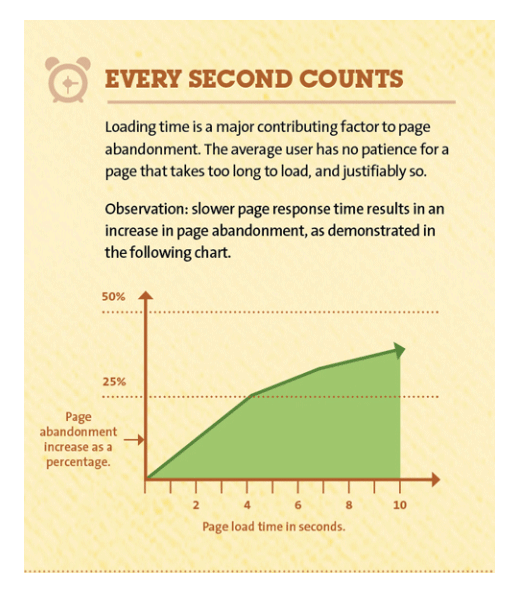
This is why it’s mega-important for your website to load quickly. If you need a way to test your website speed, use a free tool like Pingdom.
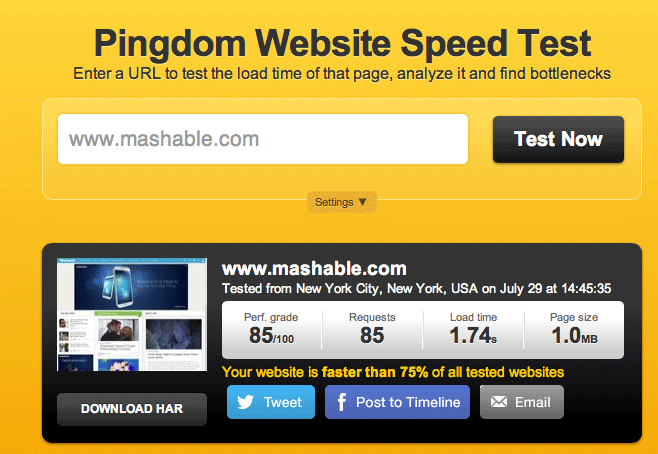
If it takes more than 3 seconds for your website to load, you can increase the speed by buying more server space, using a different CMS (for example, Magento is notoriously slow, whereas WooCommerce is known for being fast), or reducing image and file sizes.
In the example above, you can see that Mashable loads in under 2 seconds!
For more tips on increasing site speed, check out this post by Neil Patel.
Part 3: On-Page Optimization
While off-page search engine optimization (that is, link building) is important, on-page optimization is just as important. On-page optimization includes all of the actions you take within your own web pages to help your site rank better.
Think of on-page optimization as the low-hanging fruit in the SEO game. You can control this, which is great.
When it comes to on-page optimization, there are eight key targets you need to focus on:
- Keyword Optimization
- Site Structure
- Internal Linking
- Usability
- Mobile Version of Website
- Customer Reviews
- Rich Snippets
- Social Media Integration
A: Keyword Optimization
As mentioned earlier in this guide, you want to optimize your page and blog posts on your site for one keyword. In order to optimize a page, you need to ensure that page has the keyword in strategic locations, including:
- The page title
- Headers
- Subheaders
- Paragraph copy
- Product descriptions
- Image file names
- Image alt tags
- Meta title and description
- URLs
When creating URLs, be sure they are user friendly. This means they should include real words (your keyword) and not a lot of numbers and gibberish.
Also, remember that your meta title and descriptions should not sound like gibberish or be packed with keywords either. They should read like an ad because the higher your click-through rate (CTR), the higher Google will place you in its results. Makes sense, right?
For example, when I search for “conference promotional products,” here are two listings that come up on the first page:


Which of these two descriptions would get YOU to click? The keyword stuffed one or the one that entices you with a benefit (that is, learning how promotional products can create a lasting impact on your company)? Once you break it down like this, on-page optimization begins to make a lot more sense.
B: Site Structure
If you’re building a website from the ground up or executing a re-design, information architecture is a must. We’ve talked a bit about architecture, but let’s dive in a bit deeper.
As you know, great architecture can dramatically affect your website’s usability, rankings, and conversions. In addition, proper planning will make expanding your product lines in the future a breeze. This is especially true with e-commerce websites because of the sheer size of the website.
With usability in mind, use a tool like LucidChart to create a chart of your website’s information architecture.
Focus on creating a “flat architecture” for your website, meaning design that requires as few clicks as possible to go from your home page to your product page. This way, the maximum amount of “link juice,” or authority, will pass from your home page to your product page via internal links.
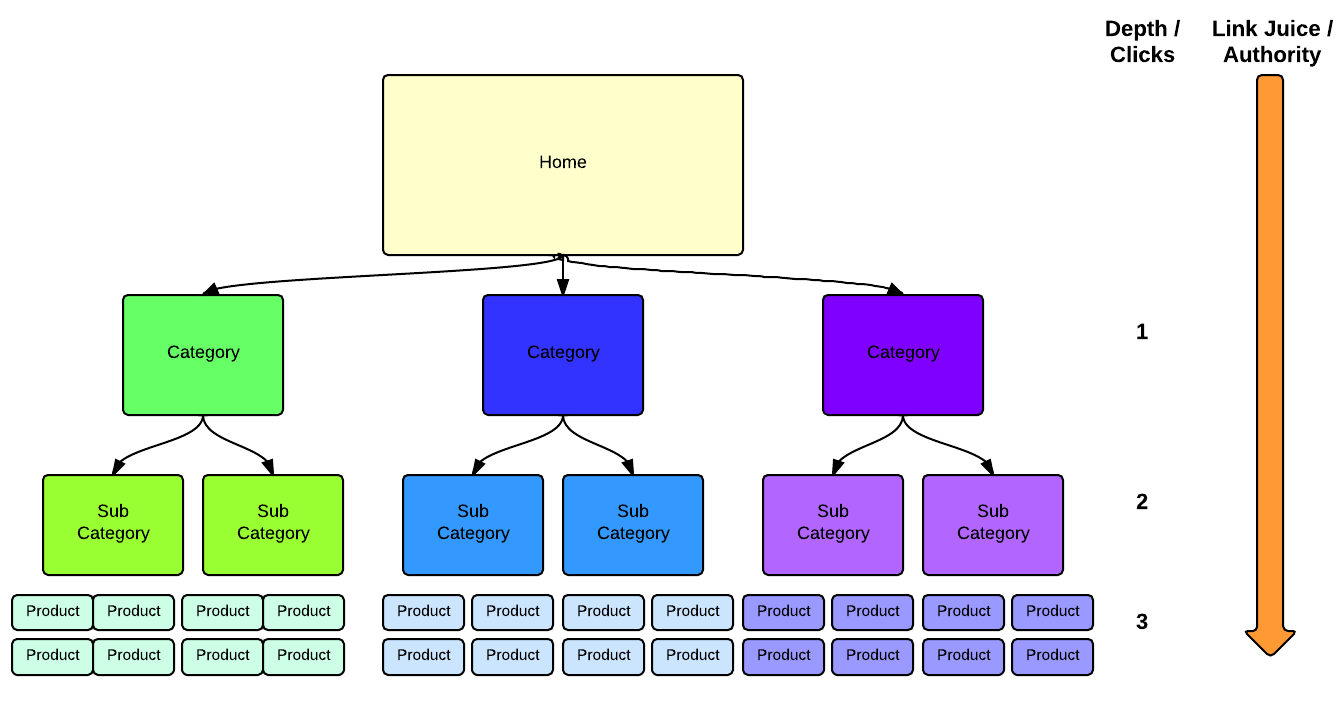
Then, take your findings from the keyword research you did at the beginning, and base your architecture on your targeted keywords in a way that still provides your customers and search engines a logical path from the home page to product pages.
For example, if you run an online pet food store, your site structure could look like this:
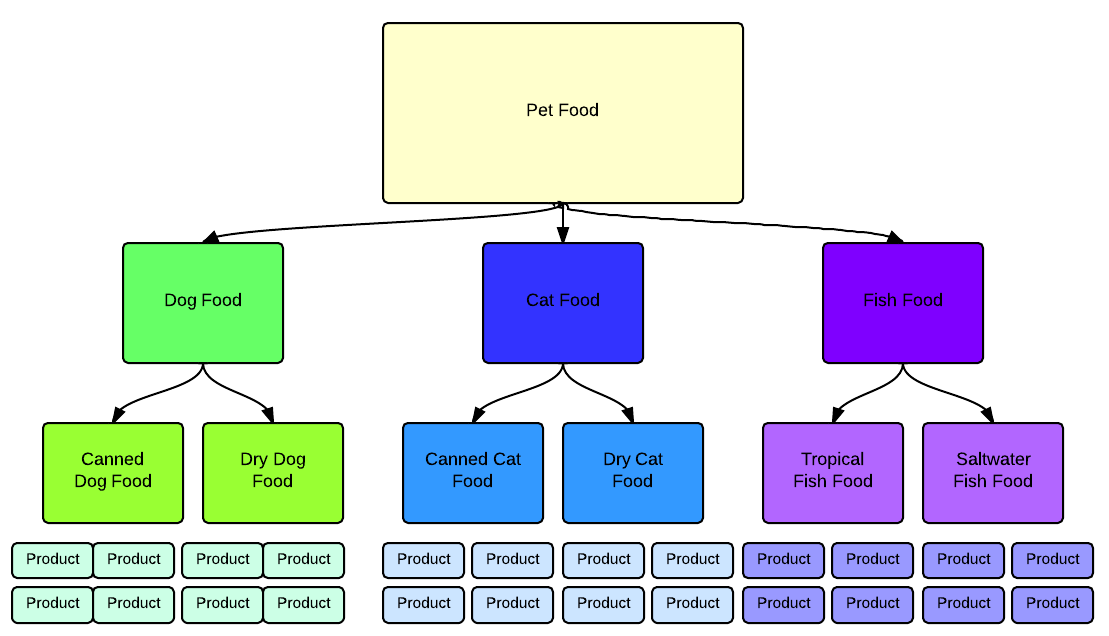
Of course, these examples are very simple, and your website may be more complex. If you get totally stumped, reach out to the SEO community through a consultant, bloggers, or the Moz.com Q&A section to ensure you get it right the first time. There also are other in-depth information architecture guides that can be found here, here and here.
The layout illustrated above obviously has links from the home page down to the product page. It’s also helpful to link between pages and categories to distribute “link juice” to pages that have a higher priority for ranking. I’m sure you’re starting to get the picture now!
C: Internal Linking
The next step is internal linking. You might not have heard of this before, but I’m sure you know what it is. This is when you link pages of your website to other pages within your website.
Internal linking allows you to establish your own anchor text, which can help you with ranking for your top keywords.
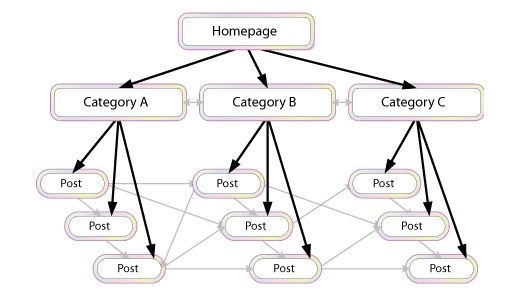
However, when it comes to internal linking, you should be sure to use it somewhat sparingly. If you pack all of your pages with internal links, Google will think you are trying to do something suspicious. Google is smart and the algorithm will pick this up. Rather, you should place internal links only where it is natural to do so.
Additionally, don’t add a lot of links with the same exact anchor text. Google looks for anchor text variety from both inbound and internal links.
Finally, once you have completed your website, you should create and submit a sitemap to Google so it can crawl your entire website and index each page.
D: Usability
Usability is super-important for SEO and for making your site visitors happy. If your e-commerce site has great usability, your customers will start visiting your site repeatedly, which is the goal!
Great user experience means a website is easy to use, fun, and helpful. Great user experience also means your users will spend more time on your site.
Part of your usability testing should include making sure there are as few steps as possible in the checkout process, ensuring the checkout process works seamlessly, giving your visitor quick ways to contact you, making it simple for visitors to navigate to other important information, and guaranteeing your site loads quickly.
I often recommend using a live chat widget. This works well to lift conversion rates and also increases the average time on site per session, which is great for SEO purposes.
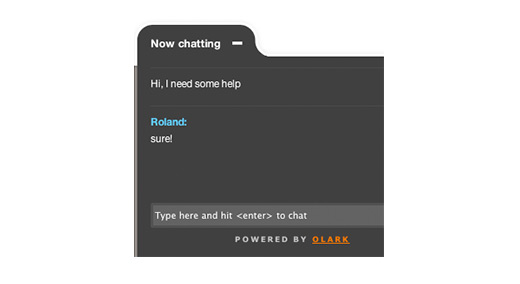
If you’re looking for a live chat tool, check out Olark.
E: Mobile Version of Website
Do you know how hot mobile shopping is becoming? Many people are not only browsing the web, but also making purchases through mobile devices, which means it’s really important to have a mobile-friendly version of your site.
Need some convincing? Check out these stats:
- 31% of mobile Internet users “mostly” go online using their phones (Pew, 2012)
- 61% of customers who visit a mobile unfriendly site are likely to go to a competitor’s site (IAB)
- 58% of mobile users expect mobile sites to load as quickly or faster than desktop sites (Google, 2011)
Many companies have had issues with the mobile versions of their websites. Because they produced duplicate content, it creates SEO problems and affects Google’s algorithm for your ranking.
With the advent of responsive website design, you can code a site so that it works on any device (desktop, tablet, mobile phone) without creating multiple sites. This is great news for e-commerce sites.
If you do not have a web developer on your staff, you can purchase and customize a responsive design template from Themeforest.net or any number of other template sites.
Themeforest has a particularly good selection of e-commerce templates.
F: Customer Reviews
Of course, a staple for any e-commerce site is customer reviews for each product.
According to Internet Retailer, you can increase your e-commerce conversion rateby 14-76% by adding product reviews to your online store. Jupiter Research also found that 77% of consumers read reviews before purchasing online.
In addition to increasing conversions, customer reviews also positively impact your SEO because more reviews = more content, and frequent reviews = fresh content, which Google loves to see.
To obtain more customer reviews, you can use a reward-based plugin like WooTheme’s Review for Discount option.
You also can send an email out a few days after you know a customer has received a product asking if they need any assistance, and, if not, would they please leave a review. Simple tricks like this will really help your SEO!
G: Rich Snippets
If you’ve used Google recently, you’ve probably noticed results looking like this:

Or this…

These are “rich snippets” and they have a huge impact on a website’s rankings.
There are types of rich snippets for authors, business information, events, music albums, people, products, recipes, reviews, and videos.
Rich snippets are HTML coded bits that tell search engines what searchers should be able to understand about your website before even clicking through to see it.
When people see results in Google with images, they’re more likely to click and convert into a customer.
To install rich snippets, follow these instructions:
- Get into your HTML of each page that you want rich snippets on.
- Add the microdata for the desired rich snippet. Read this guide from HubSpot to learn how to get the appropriate code. Then, publish the changes.
- Test to make sure it works here:http://www.google.com/webmasters/tools/richsnippets.
H: Social Media Integration
An e-commerce site wouldn’t be complete without social media! Social media signals (growing your community, engaging with customers, and sharing content)impact your SEO.
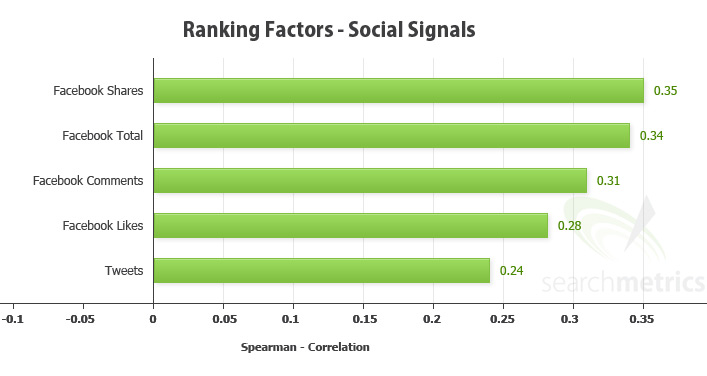
Having a lot of social signals tells Google that people find your website and brand valuable.
You can begin growing your social signals quickly by adding social buttons to your product pages, blog posts, and homepage.
According to Jayson DeMers at Forbes, “A branded social presence can help build word of mouth that gets you customers, mentions, and links.”
Perhaps the #1 social media channel you need to set up and engage on is Google+. Forbes says, “Google has been explicit that social signals play a role in its algorithm. Twitter and Facebook matter some, but many of the search results from both networks are restricted. Therefore, the network that carries the most weight is Google+.”
Part 4: Further Testing
After you have worked on your on-page SEO (including usability), it’s important to put a testing and optimization strategy in place.
You should:
- Use analytics to see which keywords are converting the highest
- Use PPC campaigns to find high-converting keywords you should add to your SEO strategy
- Test meta titles and descriptions to increase click-throughs
- A/B test page content to increase conversions from web traffic
Having a strong testing strategy in place will help your results continue to improve. Without constant iteration, your rankings could drop and you could be losing out on leads or sales due to a poor conversion rate.
Part 5: Adding Blog Content
As mentioned in Part 1: Research, keyword research is crucial to any SEO strategy. Since each page of your site should be optimized for only one keyword, there will be plenty of important keywords that don’t make it onto a page of your site.
The way to rank for those keywords is through a blog. With a blog, you can optimize each post for a keyword that you aren’t targeting with the main pages of your site.
As with your website pages, your blog posts need to be high quality and reader-friendly. You should hire an experienced, professional writer who not only understands your industry, but also has a basic knowledge of SEO.
If your posts are keyword stuffed or low quality, your customers will not read them and they certainly won’t share them. Also, as you know, Google will penalize you for keyword stuffing and you won’t earn any social signal points either.
When you’re creating blog content, consider packaging together various posts on the same theme into a downloadable eBook or guide.
Kyle Lacy, Senior Manager of Content Marketing and Research for ExactTarget says, “The contents of an eBook can be easily published in their entirety or as teaser content to drive more interaction, downloads, and overall interest in your eBook. Basically, when it comes to content marketing, your goal shouldn’t be to generate a ton of content, but rather use the content you create effectively.”
As an example, if you are an e-commerce business that sells jewelry, you might write a series of posts on how to select the perfect diamond for an engagement ring, how to finance the cost for the ring, and you might even include creative, romantic tips for a memorable proposal. Then, you could package those posts together into a downloadable eBook or guide.
The eBook or guide could be downloaded after buyers entered their email address into a lead generation form or landing page.
Later, you could send them a series of sales and marketing emails prompting the potential buyer to purchase the engagement ring from your store.
While you’re putting together this type of content marketing and email campaign, remember when it comes to writing any web content, always be thinking about quality!
Part 6: Link Building
Similar to content, you will want to concentrate on earning quality inbound links, when it comes to link building.
Not only will Google penalize your site if a lot of low quality sites are linking to you, but also the referral traffic won’t do anything positive for your business.
A low quality inbound link would be one from a low authority website. (Remember: you can use Moz’s toolbar to quickly see the authority level of any domain, as we discussed earlier!)
You usually can tell a low quality site just by looking at it. They tend to be full of ads and contain poorly written, keyword stuffed content.
Speaking of which, content farms (sites that accept guest posts from anyone about anything) usually will provide you with a low quality link. Google does not like content farms so stay away from them if you can!
Instead, focus on earning links from really good, high authority sites by offering something of value to them in exchange for a link.
You can do this by offering a high-quality guest post, providing a quote for a story, co-authoring a research study, putting together a great infographic, and so on.
Try using a free service like HARO (Help a Reporter Out) to find press opportunities.
Here are a few types of links best suited for e-commerce websites:
- Product reviews (use email)
- Press mentions (use HARO)
- Awesome content (learn how with the free ebooks from Copyblogger)
- Broken link building (learn how in this QuickSprout infographic)

A quick note about broken link building: while it is an effective means for generating inbound links, it should be low on the prioritization checklist.
According to Dana Lookadoo, president of Yo! Yo! SEO:
“Broken link building is not a primary focus on a new SEO project, usually. An SEO audit would uncover needs, and from there a prioritization action list would be developed. Information architecture issues usually get priority and then a clean-up of any issues that affect the site’s authority and trust in the eyes on the search engines. Once the on-site SEO and content strategy are solid, then broken link building outreach can be considered as part of the off-site [link building] efforts.”
As you’re working through the above list of link building tasks, keep in mind that when it comes to link building, you should NOT:
- Use the same anchor text repeatedly – go for variety
- Link to the same page repeatedly – link to the most relevant page
- Get links from low authority websites
Of course you won’t always be able to control the anchor text or which page is looked to, but that’s okay. This probably will lead to variety naturally.
If you have a close relationship with the website owner, you could kindly request specific anchor text, but otherwise you should just say thank you and not bug that person to change the anchor text or link. It’s better to establish positive relationships with high authority sites than to argue over one link, which alone will not hurt your SEO.
Part 7: Local Business Tips
Are you a local business? If you are a brick-and-mortar business, you will want to ensure you have your name, address, and phone number (NAP) for all locations showing on your website. You must use the same NAP formatting across all websites.
Additionally, you should submit your business to all of the major directories and as many niche directories as makes sense. (They must be relevant to your business.) You also should use location based keywords in your descriptions where appropriate.
All of this is very important because Google blends local and organic search rankings. According to Dr. Pete at Moz, there is an “opportunity for sites that might be weak on organic ranking factors” to be “decently optimized for local” nevertheless.
He also claims “there’s potential opportunity for some of the lower-ranking organic results to get promoted above other organic results by improving their local ranking factors.”
Get It Done!
There are many reasons you should optimize your site for search engines, but the bottom line is to increase sales.
When SEO is done right, you will see an increase in quality traffic, which will lead to more conversions and repeat visitors.
Before you get started, understand this: SEO work isn’t a one-time deal. Google and the other major search engines are updating their algorithms constantly in order to bring the best results to searchers. Because of this, you’ll need to stay on top of the updates and adjust your strategy accordingly.
There is no doubt that SEO work requires a lot of time and dedication, but the benefits are worth it, and I hope that this guide helps you get your SEO strategy in place to boost your sales from your e-commerce site!
