Sunday, 6 November 2016

Difference between Sql Server Char and Varchar Data Type

Everyone knows about the basic difference between CHAR and VARCHAR data types. In this article apart from the basic difference, will discuss on one more interesting difference which I have observed recently.
CHAR Data Type is a Fixed Length Data Type. For example if you declare a variable/column of CHAR (10) data type, then it will always take 10 bytes irrespective of whether you are storing 1 character or 10 character in this variable or column. And in this example as we have declared this variable/column as CHAR(10), so we can store max 10 characters in this column.
On the other hand VARCHAR is a variable length Data Type. For example if you declare a variable/column of VARCHAR (10) data type, it will take the no. of bytes equal to the number of characters stored in this column. So, in this variable/column if you are storing only one character then it will take only one byte and if we are storing 10 characters then it will take 10 bytes. And in this example as we have declared this variable/column as VARCHAR (10), so we can store max 10 characters in this column.
Below example illustrates the basic difference explained above:
1
2
3
4
DECLARE @CharName Char(20) = 'Basavaraj',
  @VarCharName VarChar(20) = 'Basavaraj'
 SELECT DATALENGTH(@CharName) CharSpaceUsed,
  DATALENGTH(@VarCharName) VarCharSpaceUsed
Result:
CharSpaceUsed VarCharSpaceUsed
------------- ----------------
20            9
(1 row(s) affected)
Below is an interesting difference, which I have observed recently while writing some script.
Concatenation of CHAR variables:
1
2
3
4
5
6
7
8
9
10
DECLARE @FirstName Char(20) = 'Basavaraj',
  @LastName Char(20) = 'Biradar'
 
IF @FirstName + ' ' + @LastName = 'Basavaraj Biradar' 
 PRINT 'I was Expecting'
ELSE 
 PRINT 'Surprise to me ...'
 
SELECT  @FirstName + ' ' + @LastName AS Name,
 len(@FirstName + ' ' + @LastName) AS Length
Result:
Surprise to me …
Name                                      Length
—————————————– ———–
Basavaraj            Biradar              28
(1 row(s) affected)
Concatenation of VARCHAR variables:
1
2
3
4
5
6
7
8
9
10
DECLARE @FirstName VarChar(20) = 'Basavaraj',
 @LastName VarChar(20) = 'Biradar'
 
IF @FirstName + ' ' + @LastName = 'Basavaraj Biradar' 
 PRINT 'I was Expecting'
ELSE 
 PRINT 'Surprise to me ...'
 
SELECT  @FirstName + ' ' + @LastName AS Name,
 len(@FirstName + ' ' + @LastName) AS Length
Result:
I was Expecting
Name                                      Length
----------------------------------------- -----------
Basavaraj Biradar                         17
(1 row(s) affected)
So, it is clear from the above examples that during concatenation of CHAR data type variables, it includes space in-place of unused space in the result of concatenation.

difference between PRIMARY KEY and UNIQUE KEY:

Below table lists out the major difference between PRIMARY KEY and UNIQUE KEY:
PRIMARY KEYUNIQUE KEY
NULLIt doesn’t allow Null values.
Because of this we refer
PRIMARY KEY = UNIQUE KEY + Not Null CONSTRAINT
Allows Null value. But only one Null value.
INDEXBy default it adds a clustered indexBy default it adds a UNIQUE non-clustered index
LIMITA table can have only one PRIMARY KEY Column[s]A table can have more than one UNIQUE Key Column[s]
CREATE SYNTAXBelow is the sample example for defining a single column as a PRIMARY KEY column while creating a table:CREATE TABLE dbo.Customer
(
Id INT NOT NULL PRIMARY KEY,
FirstName VARCHAR(100),
LastName VARCHAR(100),
City VARCHAR(50)
)
Below is the Sample example for defining multiple columns as PRIMARY KEY. It also shows how we can give name for the PRIMARY KEY:
CREATE TABLE dbo.Customer
(
Id INT NOT NULL,
FirstName VARCHAR(100) NOT NULL,
LastName VARCHAR(100),
City VARCHAR(50),
CONSTRAINT PK_CUSTOMER PRIMARY KEY(Id,FirstName)
)
Below is the sample example for defining a single column as a UNIQUE KEY column while creating a table:CREATE TABLE dbo.Customer
(
Id INT NOT NULL UNIQUE,
FirstName VARCHAR(100),
LastName VARCHAR(100),
City VARCHAR(50)
)
Below is the Sample example for defining multiple columns as UNIQUE KEY. It also shows how we can give name for the UNIQUE KEY:
CREATE TABLE dbo.Customer
(
Id INT NOT NULL,
FirstName VARCHAR(100) NOT NULL,
LastName VARCHAR(100),
City VARCHAR(50),
CONSTRAINT UK_CUSTOMER UNIQUE(Id,FirstName)
)
ALTER SYNTAXBelow is the Syntax for adding PRIMARY KEY CONSTRAINT on a column when the table is already created and doesn’t have any primary key:ALTER TABLE dbo.Customer
ADD CONSTRAINT PK_CUSTOMER PRIMARY KEY(Id)
Below is the Syntax for adding UNIQUE KEY CONSTRAINT on a column when the table is already created:ALTER TABLE dbo.Customer
ADD CONSTRAINT UK_CUSTOMERUNIQUE (Id)
DROP SYNTAXBelow is the Syntax for dropping a PRIMARY KEY:ALTER TABLE dbo.Customer
DROP CONSTRAINT PK_CUSTOMER
Below is the Syntax for dropping a UNIQUE KEY:ALTER TABLEdbo.Customer
DROP CONSTRAINT UK_CUSTOMER

RDBMS vs. NoSQL: How do you pick?

The market is abuzz with terms like NoSQL, Big Data, NewSQL, Database Appliance, etc. Often, IT decision makers can get very confused with all the noise. They do not understand why they should consider a newer, alternative database when RDBMSs have been around for 20+ years. However, many leading enterprises are already using alternative databases and are saving money, innovating more quickly, and completing projects they could not pursue before as a result. Let’s discuss how one can determine if NoSQL is a fit for current or future applications.
Nature of dataThe first consideration that needs to be made when selecting a database is the characteristics of the data you are looking to leverage. If the data has a simple tabular structure, like an accounting spreadsheet, then the relational model could be adequate.
Data such as geo-spatial, engineering parts, or molecular modeling, on the other hand, tends to be very complex. It may have multiple levels of nesting and the complete data model can be complicated. Such data has, in the past, been modeled into relational tables, but has not fit into that two-dimensional row-column structure naturally.
In similar cases today, one should consider NoSQL databases as an option.  Multi-level nesting and hierarchies are very easily represented in the JavaScript Object Notation (JSON) format used by some NoSQL products.
The next question to ask is "what is the volatility of the data model?" Is the data model likely to change and evolve or is it most likely going to stay the same? Generally speaking, all the facts about the data model are not known at design time, so some flexibility is needed. This presents many issues to the relational database management system (RDBMS) users of the world.
During my time at IBM, we spent many hours cautioning users to design the schema right the first time, as revisions made later slowed or stopped the database from operating. For that reason, any potential changes made down the road had to be minimal. The issue of schema-rigidity still rings true today, leading to little flexibility when it comes to application development and evolution.


This "get it right first" approach may have worked in the old world of static schema, but it will not be suitable for the new world of dynamic schema, where changes need to be made daily, if not hourly, to fit the ever changing data model.  It is no wonder that many NoSQL users are Web-centric businesses which require a greater amount of flexibility.
Application development (high coding velocity & agility)The key constituency of the DBMS is the application developer community. In the past, the industry delineated the database administrator (DBA) from the application developer. The new world blurs such distinctions and demands very little dependency on dedicated DBAs. The software developer becomes the most important user.
As a database grows in size or the number of users multiplies, many RDBMS-based sites suffer serious performance issues.
The developer requires high coding velocity and great agility in the application building process. NoSQL databases have proven to be a better choice in that regard, using object-focused technologies such as JSON, for example. Even if you are a SQL shop, the incremental time to learn emerging database technologies will save lots of development cost over time.
The learning curve on JSON, for example, is quite fast and programmers can build a prototype in days and weeks. Since many NoSQL offerings include an open system, the community provides many productivity tools, another big advantage over single-vendor proprietary products. Some organizations, such as MongoDB, even offer free courses online that train employees and interested users in how to use the technology.
Operational issues (scale, performance, and high availability)I know from experience that as a database grows in size or the number of users multiplies, many RDBMS-based sites suffer serious performance issues.
Next, consultants are brought in to look at the problem and provide solutions. Vertical scaling is usually recommended at high cost. As processors are added, linear scaling occurs, up to a point where other bottlenecks can appear. Many commercial RDBMS products offer horizontal scaling (clustering) as well, but these are bolted-on solutions and can be very expensive and complex.
If an organization is facing such issues, then it should consider NoSQL technologies, as many of them were designed specifically to address these scale (horizontal scaling or scale-out using commodity servers) and performance issues. Just like Google’s HDFS horizontal scaling architecture for distributed systems in batch processing, these newer NoSQL technologies were built to host distributed databases for online systems. Redundancy (in triplicate) is implemented here for high availability.
A common complaint about NoSQL databases is that they forfeit consistency in favor of high availability. However, this can't be said for all NoSQL databases. In general, one should consider an RDBMS if one has multi-row transactions and complex joins. In a NoSQL database like MongoDB, for example, a document (aka complex object) can be the equivalent of rows joined across multiple tables, and consistency is guaranteed within that object.
NoSQL databases, in general, avoid RDBMS functions like multi-table joins that can be the cause of high latency. In the new world of big data, NoSQL offers choices of strict to relaxed consistency that need to be looked at on a case-by-case basis.
Data warehousing & analyticsRDBMSes are ideally suited for complex query and analysis. Originally DB2 and Oracle were mostly used for query-intensive workloads. Data from production systems were extracted and transformed (via ETL processes) and loaded into an RDBMS for slicing and dicing. Even in today’s world, Hadoop data is sometimes loaded back to an RDBMS for reporting purposes. So an RDBMS is a good choice if the query and reporting needs are very critical.
Real time analytics for operational data is better suited to a NoSQL setting. Further, in cases where data is brought together from many upstream systems to build an application (not just reporting), NoSQL is a must. Today, BI tool-support for NoSQL is new, but growing rapidly. 
Co-existence of RDBMS and NoSQL databasesIBM just announced the implementation of the MongoDB API, data representation, query language and wire protocol, thus establishing a way for mobile and other next-generation applications to connect with enterprise database systems such as IBM’s DB2 relational database and its WebSphere eXtreme Scale data grid. This could usher in a new wave of flexible applications that add significant value by spanning multiple data systems. 
Oracle also introduced its NoSQL product last year.
Data exchange and interoperability will continue to evolve as other industry leaders follow in IBM's footsteps and the functionality of NoSQL databases will continue to evolve over time. Fortune 1000 companies will be well-advised to look at NoSQL database solutions to meet their needs in a data-intensive business world.
The rapid adoption of these alternative databases in just a few years is a testament to their attractiveness to the new world of Big Data, where agility, performance, and scalability reign supreme.

SECOND

Overview of SQL and NoSQLnosql vs sql

Relational database (RDBMS) like SQL has been the primary model for database management during the past few decades. But today, non-relational, “NoSQL” databases are gaining prominence as an alternative model for database management. But let’s discuss why this evolution in database management is happening.
SQL (Structured Query Language) is the standard programming language used to communicate with a relational database. You can use SQL for different database operations. It is used to manage, store, and retrieve data in relational databases through applications and queries either on the same computer or over those on the network. An SQL server consists of a relational database which comprises of a set of tables containing data with predefined categories or columns. It contains structured data like names, email addresses, and phone numbers. A relational database matches data by using common characteristics found in the dataset and the resulting group is termed as Schema.
As we now need to handle immense amount of data of different categories, the “one size fits all” approach of SQL is in question. This has led to the emergence of NoSQLcommonly referred to as “Not Only SQL”. With NoSQL, unstructured data can be stored across multiple processing nodes and it does not require fixed table schemas, usually avoids join operations, and typically scales horizontally.

NoSQL – A Substitute for the Limitations of SQL?

In present day, as we are handling s humongous amount of data, data being organized and well-structured actually creates a problem, especially at extremely large volumes. The structured approach of RDBMS database like SQL slows down performance as data volume or size gets bigger and it is also not scalable to meet the needs of Big Data.
So NoSQL was conceived as a completely different framework of databases that allows for high-performance, agile processing of information at a much bigger scale. This is the database well-adapted to the high demands of big data. The new version of NoSQL runs the database MongoDB, which stores unstructured data. This means that you don’t need to know in advance exactly what kind of data you’ll be collecting and storing. You can collect a lot more data of different kinds and can access and analyze data much faster.
NoSQL is centered on the concept of distributed databases, where unstructured data may be stored across multiple processing nodes, and often across multiple servers. This distributed architecture allows NoSQL databases to be horizontally scalable; as data continues to explode, just add more hardware to keep up, with no slowdown in performance.

Benefits of NoSQL

Elastic scaling
Earlier with relational database or RDBMS, database administrators always relied onscaling up or buying bigger, expensive, multiple servers as database load increased rather than scaling out or distributing the database across multiple hosts. The new breed of NoSQL databases are designed to expand transparently and horizontally to take advantage of new nodes, and they’re usually designed with low-cost commodity hardware in mind. For NoSQL, servers can be added or removed from the data layer without application downtime.
Bigger Data Handling Capability
RDBMS capacity has been growing to match the increase in volumes of data, but the limitations of data volumes that can be handled by a single RDBMS are intolerable for some enterprises. Hadoop, an enabler of certain types of NoSQL distributed databases, allow data to be spread across thousands of servers with little reduction in performance and it outstrips that which can be handled by the biggest RDBMS.
Maintaining NoSQL Servers is Cheaper
Maintaining high-end RDBMS systems is expensive and can be only done with the assistance of expensive, highly trained DBAs. On the other hand, NoSQL databases require less management. Features like automatic repair, easier data distribution, and simpler data models make administration and tuning requirements lesser in NoSQL.
Lesser Server Cost
NoSQL databases typically use clusters of cheap commodity servers to manage the exploding data and transaction volumes, while RDBMS tends to rely on expensive proprietary servers and storage systems. So the storing and processing data cost per gigabyte in case of NoSQL can be many times lesser than the cost of RDBMS.
No Schema or Fixed Data model
Data can be inserted in a NoSQL database without first defining a rigid database schema. So the format or data model being inserted can be changed any time, without application disruption. This provides immense application and business flexibility. On the contrary, change management is a big headache in SQL. Here, even minor changes to the data model have to be carefully managed and may necessitate downtime or reduced service levels.
Integrated Caching Facility
In order to increase data output and performance advance NoSQL techniques cache data in system memory. This is in contrast to SQL database where this has to be done using separate infrastructure.

Limitations of NoSQL

Though NoSQL database has generated a lot of enthusiasm, but there are several obstacles it has to overcome it becomes appealing to mainstream companies.
NoSQL alternatives and solutions are still in nascent and pre-production stages and many key features are yet to be implemented.
Customer support is also better in RDBMS systems like SQL and vendors provide a higher level of enterprise support. In contrast, NoSQL system support is provided by small start-up companies without the global reach, resources, or credibility of Oracle, Microsoft, or IBM, the big names associated with SQL.
NoSQL databases have evolved to meet the scaling demands of modern Web 2.0 applications and are oriented to meet the demands of these applications. They offer few facilities for ad-hoc query and analysis. It is much easier to code an SQL query, but in NoSQL even a simple query requires significant programming expertise and commonly used BI tools do not provide connectivity to NoSQL.

Conclusion

SQL and NoSQL have been great inventions over time in the area of data management and have been used to keep data storage and retrieval optimized and smooth. It’s still hard to criticize one and completely go with the other option. Both technologies are best in what they do and it is up to a developer to put them to better use depending on the business situations and needs. Though NoSQL databases are becoming important part of the database landscape, however, enterprises should proceed with caution and be aware about the legitimate limitations associated with these databases.

Saturday, 5 November 2016

difference between compiler & interpreter ?

What is a Compiler?

First of all you need to understand that computers and humans speak different languages. While humans speak languages like English, French, Hindi, Spanish, Chinese, Japanese, Arabic etc.; computers speak only one language i.e. binary. Alphabet of computers contains only two letters, namely zero andone. Computers are machines and for them it is much easier to work using a simpler encoding of 0s and 1s.
We humans feel most comfortable if we could issue instructions by writing plain English  or Hindi programs for computers.
The problem is that we are not comfortable with binary and computers find our languages too difficult to understand. To get around this problem a middle path of an intermediate language is used to convey human commands to the computers. This intermediate language is called —the programming language.
Programming language is not plain English. It is essentially a predefined syntax of writing logical computer instructions which humans can also understand.
We also need something to convert programming language into binary language for the consumption by computer. This is where compiler comes in scene.
Compiler is a software that checks a computer program (called source code) and lists all the errors found. When humans remove all these errors, compiler converts the program into binary code (also known as machine code or object code). Computers can understand binary code and therefore they can execute instructions written by humans using programming language.
Source code and assembly code.
The following video will further help you in understanding the concept and working of a compiler:
Compiler vs. Interpreter
Now we already know what a compiler does. Task of interpreter is also more or less the same but interpreter works in a different fashion. The difference between the functioning of compiler and interpreter will be clear from the table of comparison given below:
#COMPILERINTERPRETER
1Compiler works on the complete program at once. It takes the entire program as input.Interpreter program works line-by-line. It takes one statement at a time as input.
2Compiler generates intermediate code, called the object code or machine code.Interpreter does not generate intermediate object code or machine code.
3Compiler executes conditional control statements (like if-else and switch-case) and logical constructsfaster than interpreter.Interpreter execute conditional control statements at a much slower speed.
4Compiled programs take morememory because the entire object code has to reside in memory.Interpreter does not generate intermediate object code. As a result,interpreted programs are more memory efficient.
5Compile once and run anytime. Compiled program does not need to be compiled every time.Interpreted programs are interpreted line-by-line every time they are run.
6Errors are reported after the entire program is checked for syntactical  and other errors.Error is reported as soon as the first error is encountered. Rest of the program will not be checked until the existing error is removed.
 7A compiled language is more difficult to debug.Debugging is easy because interpreter stops and reports errors as it encounters them.
 8Compiler does not allow a program to run until it is completely error-free.Interpreter runs the program from first line and stops execution only if it encounters an error.
 9Compiled languages are more efficient but difficult to debug.Interpreted languages are less efficient but easier to debug. This makes such languages an ideal choice for new students.
10Examples of programming languages that use compilers: C,  C++, COBOLExamples of programming languages that use interpreters: BASIC, Visual Basic, Python, Ruby, PHP, Perl, MATLAB, Lisp
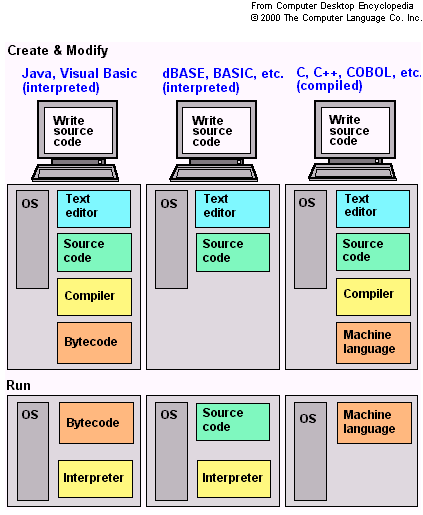
Following image shows how different languages are either compiled or interpreted:
Difference between compiler and interpreter.
Difference between Compiler and Interpreter
So, what did we understood from the above table of comparison? We now know that the reason a compiled runs faster because it gets converted into machine code all at once. Computer can easily understand machine code and therefore can run the whole program quickly. But this also means that theentire compiled code has to reside in the memory —and thereby making the compiled programs more memory guzzling. With memory available in abundance, nowadays, this is no longer a concern. But in earlier days of programming, when memory was an expensive resource, program size up to every bit and byte used to matter.
In comparison, interpreter is a more human-friendly program. It works quite a bit like humans work. It begins program execution right at the first line and will go on showing you the result of the program until it will hit an erroneous line of code. As a result, for programmer it is much easier to locate error and to understand the nature of error. However, interpreter is slow. An interpreted programs gets interpreted every time it runs.

Friday, 4 November 2016

Interview Question


Q1. Difference between threads and process?
Q2. how threading works at CPU level?
Q3. Idea about thrashing?
Q4. List page replacement policies?
Q5. what data structure uses FIFO?
Q6. How paging works ?
Q7. what are page faults?
Q8. what is ATM?
Q9. Have you ever made a thread based program in c?
Q10. Let suppose there is a large file of about 1PB ( = 1000TB ) and you want to read it using 4 threads. How it these threads would work.
I said about Sync but he asked in a bit details.
Q11. A large linked list is given with a pointer to a middle node. How would you delete that node ?

Q12. He asked about what Internet Technologies I have worked on ?
I listed html,css,php,js,jquery,ajax
Q13. how the server works ? what server you used ? ( i said apache )
Q14. Is server a process or a thread.
I just guessed that the server is a process that is continuously listening to a port and when a request comes through the network it creates a thread for it which invokes the interpreter to execute php
Q15. He asked difference between compiler & interpreter ? can php be compiled ?
Answer :
The PHP language is interpreted. The binary that lets you interpret PHP is compiled, but what you write is interpreted.
Q16. are you comfortable with php ? ( after yes )

$a = 2;
if( $a = 3 )

echo “Hello”;
else
echo “False”;

Output ?
Q17. What is Ajax ?
Q18. how the ajax works ? tell me about headers ?
Q19. What is an IP Address and of how many bits ?

Answer - Ip address is Internet Protocol address which has IPv4(old version) is of 32-bits and IPV6- new version is of 128-bits

Q20. what is network addressing ? your networks would have a public id address then who manages the internal networks ip addresses ?

Q21. What are relational databases ? why we use relational databases ? Have you worked over NoSQL ?

Q22.  What is Left Inner Join ? Write C code for Left Inner Join if the two tables are given in form of arrays.
Q23.  What is difference between Unique Key and Primary Key.
Q24. What are Web Sockets ? ( I mentioned this in my Resume so he asked )What is Socket Programming ?

Q25. What UDP has advantages over TCP.
Q26. What is HTTP ?
Q27. How HTTP request transfers form Client to Server ? What are the headers associated with it ?
Q28. Reverse of a Linked List?
Q29. What is MVC framework ? Tell me about it’s workflow ? ( Resume Question )
Q30. What is JSON ? What is XML ?
Q31. Write a sample JSON and XML. Which one is better ? What are the advantages of JSON over XML!


Q1. Implement queue with the help of two stacks.
Q2. Given a table “student” of with columns Name and Marks. You have to write a SQL query to get the 2nd highest marks from the table. Also write a query to find the nth highest marks, where n can be any number.
Q3. What is left join. Give example. And Full outer join?
Q4. What is magic functions and autoloading in PHP?

Q1. Given three arrays sorted in non-decreasing order, print all common elements in these arrays.
Examples:
ar1[] = {1, 5, 10, 20, 40, 80}
ar2[] = {6, 7, 20, 80, 100}
ar3[] = {3, 4, 15, 20, 30, 70, 80, 120}
Output: 20, 80
Q2. A puzzle. You will be given with a 3 Litre container & a 7 Litre Container. Measure exactly 5 Litres of water.

Q1. Asked about one of my projects I mentioned in my resume?
Q2. Find if a number is a power of 2 or not?

Overall it was a very good experience. They test


Round 1:

Q1. Find the first non repetitive character in a string?
Q2. What is connection pooling.
Q3. Write a singleton class in php?

Round 2:

Q1. How to write a Connection class to MySQL database using PHP?
Q2. What are the different types of error in php?
Q3. How session works in php?
Q4. Find missing element in an array of elements from 0 to n-1?


Round 1:

Q1. Given a no K and an array. Find pair of elements whose sum is equal to given no K.
Q2. If there is a website run by 2 servers. These 2 servers balances the load using Load Balancer. So, if 1 session is created on 1 server and say load is shift to another server immediately, then how session is maintained?
Q3. WAP to implement some basic Design Patterns like Singleton?
Q4. Abstract class? How it is different from interface? Is multiple inheritance possible in php? How?
Q5. Write a stored procedure from a given set of tables and conditions. Simple one.

Round 2:

Q1. How to increase php memory at run time, if it exhausts?
Q2. What all we can do with php.ini?
Q3. session and cookies?
Q4. Javascript clausers?
Q5. Jquery function to get domain from a url?

Round 3:

Q1. WAP to get smallest plindron number larger than the given no?
Q2. WAP to check if linked list elements is a palindrome without using any extra space?


Round 1:

Q1. If your Apache web server is serving pages slowly, how would you troubleshoot the problem?

Q2. How many times can you include a php file in another php file?

Q3. What is ob_start(); used for? Why would you use it when developing web pages?

Q4. What is a table index? Why would you use it? Diff types of index?

Q5. If there is some code change in you java script file and browser is still displaying the old one what might be the reason? How to avoid it? WHat are differnet appraches other than renaming the file?

Round 2:

Q1. What are benifits of minifying the java script code?

Q2. Why java doesn’t support multiple inheritence?

Q3. Abstract class and interface?

Q4. Difference between http and https? Secure web architecture?

Q5. Describe how you would extract data from a web service if it returns JSON?


Round 3 (From US some one will take on skype):

Q1. Sql injection, Xss attack?

Q2. Write a function which will tell angle between hours hand and minute hands of clock?

Q3. Do you have experience with JavaScript frameworks? Which ones? Which one do you like the most? Why?

Q4. You have a table with an unknown number of records. You want to delete half of the records. You don’t care which records are deleted. What’s the most efficient way to do it?


It contains 4 questions.
Q1. An array and a number is given. You have to find the no with the min difference with this number?
Q2. Email and Mobile Number validation check regex?
Q3. mysql query question on self join?
Q4. A class and object architecture based on given scenario?

Technical Questions :-

Q1. What is the difference between get and post?
Q2. What is session in php?
Q3. Where does session id is stored in php? How server identifies request has come from which client and many other related questions?
Q4. Cookie in php? Size of the cookie, expiry etc?
Q5. Memcache?
Q6. Myisam and Innnodb?
Q7. Triggers in mysql?
Q8. Overriding and Overloading?
Q9. Static class and static variable?
Q10. Singleton pattern and factory pattern?
Q11. Can constructor be declared as private?
Q12. Indexing in mysql?

Difference between Threads vs Process

Both processes and threads are independent sequences of execution. The typical difference is that threads (of the same process) run in a shared memory space, while processes run in separate memory spaces.
I'm not sure what "hardware" vs "software" threads might be referring to. Threads are an operating environment feature, rather than a CPU feature (though the CPU typically has operations that make threads efficient).
Erlang uses the term "process" because it does not expose a shared-memory multiprogramming model. Calling them "threads" would imply that they have shared memory

Process
Each process provides the resources needed to execute a program. A process has a virtual address space, executable code, open handles to system objects, a security context, a unique process identifier, environment variables, a priority class, minimum and maximum working set sizes, and at least one thread of execution. Each process is started with a single thread, often called the primary thread, but can create additional threads from any of its threads.
Thread
A thread is the entity within a process that can be scheduled for execution. All threads of a process share its virtual address space and system resources. In addition, each thread maintains exception handlers, a scheduling priority, thread local storage, a unique thread identifier, and a set of structures the system will use to save the thread context until it is scheduled. The thread context includes the thread's set of machine registers, the kernel stack, a thread environment block, and a user stack in the address space of the thread's process. Threads can also have their own security context, which can be used for impersonating clients.

The major differences between threads and processes are:
  1. Threads share the address space of the process that created it; processes have their own address space.
  2. Threads have direct access to the data segment of its process; processes have their own copy of the data segment of the parent process.
  3. Threads can directly communicate with other threads of its process; processes must use interprocess communication to communicate with sibling processes.
  4. Threads have almost no overhead; processes have considerable overhead.
  5. New threads are easily created; new processes require duplication of the parent process.
  6. Threads can exercise considerable control over threads of the same process; processes can only exercise control over child processes.
  7. Changes to the main thread (cancellation, priority change, etc.) may affect the behavior of the other threads of the process; changes to the parent process do not affect child processes.


Process:
  • An executing instance of a program is called a process.
  • Some operating systems use the term ‘task‘ to refer to a program that is being executed.
  • A process is always stored in the main memory also termed as the primary memory or random access memory.
  • Therefore, a process is termed as an active entity. It disappears if the machine is rebooted.
  • Several process may be associated with a same program.
  • On a multiprocessor system, multiple processes can be executed in parallel.
  • On a uni-processor system, though true parallelism is not achieved, a process scheduling algorithm is applied and the processor is scheduled to execute each process one at a time yielding an illusion of concurrency.
  • Example: Executing multiple instances of the ‘Calculator’ program. Each of the instances are termed as a process.
Thread:
  • A thread is a subset of the process.
  • It is termed as a ‘lightweight process’, since it is similar to a real process but executes within the context of a process and shares the same resources allotted to the process by the kernel.
  • Usually, a process has only one thread of control – one set of machine instructions executing at a time.
  • A process may also be made up of multiple threads of execution that execute instructions concurrently.
  • Multiple threads of control can exploit the true parallelism possible on multiprocessor systems.
  • On a uni-processor system, a thread scheduling algorithm is applied and the processor is scheduled to run each thread one at a time.
  • All the threads running within a process share the same address space, file descriptors, stack and other process related attributes.
  • Since the threads of a process share the same memory, synchronizing the access to the shared data withing the process gains unprecedented importance.